

When BCBS denies a claim, identify the type from your EOB: medical necessity (CO-50), prior auth (CO-197), timely filing (CO-29), or a coding error (CO-4). Commercial appeal windows vary by BCBS affiliate and contract, so use the deadline on the denial notice; Medicare Advantage reconsiderations are due within 60 days. Most affiliates accept appeals through Availity — and for Carelon-managed specialty denials, request a peer-to-peer review with Carelon before filing.
Why BCBS Denials Require a Type-Specific Response
Blue Cross Blue Shield is not a single insurer — it is a federation of more than 30 independent licensees operating under the BCBS Association brand. Anthem, BCBS of North Carolina, BCBS of Texas (HCSC), Florida Blue, Premera Blue Cross, Highmark, and BCBS of Massachusetts all operate independently, with their own appeal forms, submission portals, fax numbers, and clinical criteria processes.
Despite this fragmentation, BCBS affiliates share a common denial taxonomy: the same Claim Adjustment Reason Codes (CARCs) appear on EOBs across the federation, and the same general response framework applies. Where affiliates diverge is in the submission channels, specific deadlines, and the third-party reviewers who handle specialty service decisions.
The most common billing team error is treating all BCBS denials as equivalent and routing every denial through the same appeal channel. A timely filing denial requires clearinghouse documentation, not a clinical narrative. A Carelon-managed specialty denial requires a peer-to-peer call to Carelon — not to your local BCBS affiliate's provider services line.
This guide maps each denial type to the correct response path, with affiliate-specific routing notes where the process materially varies.
For context on how BCBS denial rates compare across the federation and to other major payers, see the BCBS denial rate by state guide and the full insurance denial rate comparison by company.
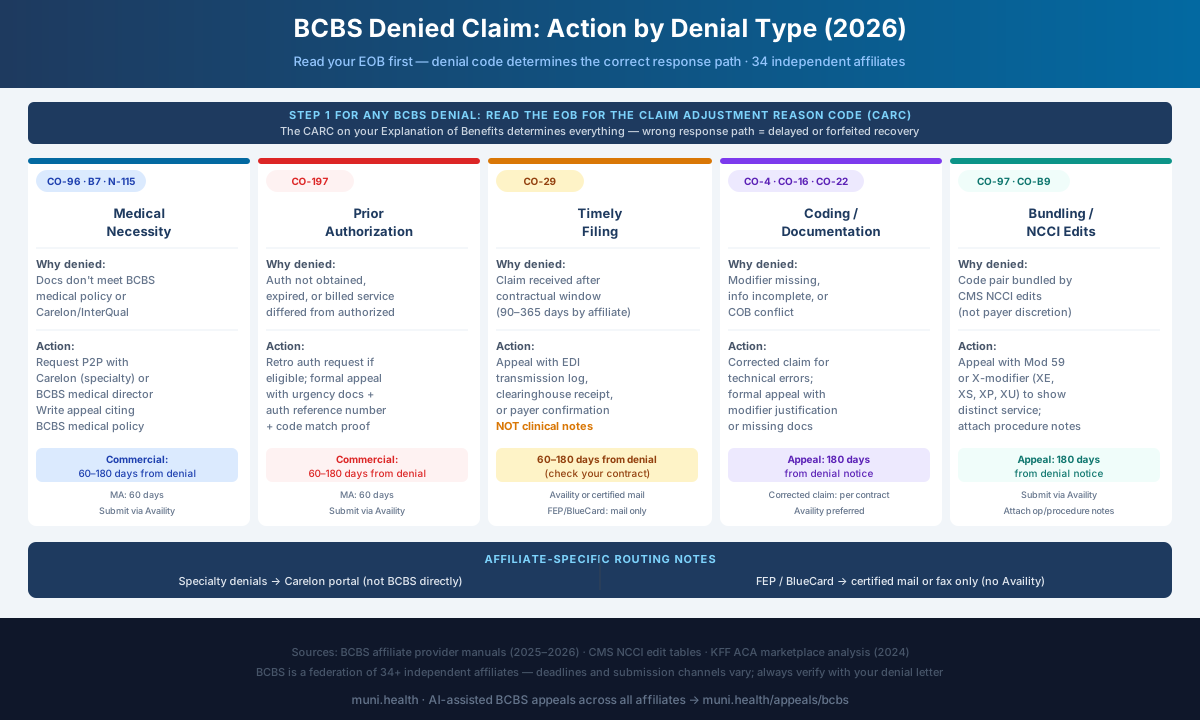
The Five BCBS Denial Categories (and What Each Requires)
| Denial Category | Common Codes | Primary Cause | Appeal Path | Deadline |
|---|---|---|---|---|
| Medical Necessity | CO-50 | Documentation does not meet BCBS medical policy criteria or Carelon/InterQual guidelines for the service | Peer-to-peer review with Carelon (specialty) or BCBS Medical Director (standard); written appeal with clinical records and BCBS medical policy citations | Commercial: varies by affiliate and contract; MA: 60 days |
| Prior Authorization | CO-197 | Auth not obtained, expired, or billed service differed from authorized service (code, site, or date mismatch) | Retroactive auth request if eligible; formal appeal with clinical urgency documentation, auth reference number, and code-match verification | Commercial: varies by affiliate; MA: 60 days |
| Timely Filing | CO-29 | Claim received after the contractual filing window (90–365 days depending on affiliate and contract) | Appeal with clearinghouse transmission log, EDI acknowledgment, or payer receipt confirmation proving timely submission | Per affiliate contract; check the denial notice |
| Coding / Documentation | CO-4, CO-16, CO-22, CO-97 | Modifier missing, service bundled, claim information incomplete, or coordination of benefits conflict | Corrected claim resubmission for technical errors; formal appeal with modifier justification or missing documentation supplied | Appeal: per affiliate contract; corrected claims per contract |
| Bundling / NCCI | CO-97 | Claim includes a code pair subject to CMS National Correct Coding Initiative bundling edits | Appeal with modifier 59 or X-modifier (XE, XS, XP, XU) to establish distinct service; attach operative or procedural notes | Per affiliate contract |
Step 1: Read the EOB Before Doing Anything Else
Every BCBS Explanation of Benefits contains the routing information needed to respond correctly:
- Claim Adjustment Reason Code (CARC) — the primary code explaining why the claim was denied or adjusted
- Remittance Advice Remark Code (RARC) — additional context, often identifying the specific medical policy applied or the documentation gap
- Group code — CO (contractual obligation, typically a write-off under your network agreement) vs. PR (patient responsibility) vs. OA (other adjustment)
- Appeal deadline — stated explicitly on the EOB or denial letter; do not rely on general estimates when your BCBS affiliate contract may specify a shorter window
- Third-party reviewer — the EOB will often identify whether the denial was issued by BCBS directly, by Carelon Medical Benefits Management (specialty imaging, MSK, cardiology, sleep), or by another delegated reviewer
Affiliate Variation: Check the Plan Name on the EOB
BCBS denials from Anthem, Florida Blue, Premera, BCBS NC, BCBS TX, Highmark, or BCBS MA each route to a different submission portal and may use different appeal forms. Always check which BCBS affiliate issued the denial before submitting. Using the wrong fax number or portal for a different BCBS affiliate's plan will delay or lose your appeal.
For Anthem-specific form and Availity submission steps (including the two-step Reconsideration → Appeal sequence and state-specific routing), see the Anthem Blue Cross Appeal Form Guide 2026. For a denial-type triage guide covering Anthem's PDR track, EviCore routing, and Medicare Advantage deadlines, see the Anthem Denied Claim Guide 2026.
Step 2: Match the Denial to Its Action Path
Medical Necessity Denials (CO-50)
A medical necessity denial from BCBS means that the clinical documentation submitted did not meet the criteria in the applicable BCBS medical policy, Carelon clinical guideline, or a licensed criteria set such as InterQual or MCG that some affiliates use. Most BCBS affiliates publish their medical policies on their provider websites.
Immediate actions:
- Identify whether the denial was issued by BCBS directly or by a delegated clinical reviewer. Carelon Medical Benefits Management (formerly AIM Specialty Health) manages specialty imaging, musculoskeletal, cardiology, and sleep services for many BCBS affiliates. The denial letter or EOB remark code will indicate the reviewing entity.
- Locate the specific BCBS medical policy or Carelon clinical guideline cited in the denial. Record the policy's exact title, number, and effective date as printed by the affiliate. Carelon clinical guidelines are available at carelonbenefitsmanagement.com.
- Request a peer-to-peer review before filing the written appeal. For Carelon-managed services, call Carelon's provider line (number on your denial letter) to request peer-to-peer with the reviewing medical director. For standard BCBS denials, call your affiliate's provider services line and request a medical director review. The treating physician — not billing staff — should conduct this call.
- If peer-to-peer does not result in reversal, file a formal written appeal through Availity or the channel named on the denial letter. The letter template after Step 2 gives you the structure. Attach clinical records, a physician narrative, and direct citations to the applicable BCBS medical policy criteria.
2026: CMS-0057-F Requires a Specific Reason for PA Denials
Beginning January 1, 2026, the CMS Interoperability and Prior Authorization Final Rule (CMS-0057-F) requires impacted payers — including BCBS Medicare Advantage plans — to give a specific reason when they deny a prior authorization request. If your denial gives only a generic reason, say so in your appeal and ask the plan to identify the unmet criterion.
For a complete BCBS medical necessity appeal letter template and clinical policy citation strategy, see the BCBS medical necessity letter guide.
Prior Authorization Denials (CO-197)
CO-197 means either: (a) no prior authorization was obtained before the service, (b) authorization was obtained but expired before the service date, or (c) the service billed differed from what was authorized — a different CPT code, site of service, or number of units.
Immediate actions:
- Check whether retroactive authorization is available for the situation. Most BCBS affiliates allow retro auth requests for emergencies and certain urgent situations — submit a retro auth through Availity or your affiliate's portal with clinical urgency documentation.
- Verify the CPT code on the claim against the CPT code on the authorization. A frequent CO-197 trigger is billing a code that was not explicitly listed on the authorization, even when the service itself was clinically equivalent.
- If retro auth is not available, file an appeal with documentation explaining why authorization could not be obtained prior to service, or why the billed service was within the scope of the authorized service.
Carelon and eviCore Manage Many BCBS PA Decisions
For specialty services, many BCBS affiliates delegate prior authorization to Carelon Medical Benefits Management (imaging, MSK, cardiology) or eviCore healthcare (oncology, sleep, GI, genetics for some affiliates). PA denials for these services are issued by the delegated reviewer, not by BCBS directly — meaning the peer-to-peer and appeal must go to that reviewer. Your denial letter will identify the issuing entity.
For a complete BCBS prior authorization appeal workflow and documentation templates, see the BCBS prior authorization template guide.
Timely Filing Denials (CO-29)
CO-29 means BCBS received the claim after the contractual filing deadline. Initial claim filing windows vary by BCBS affiliate — from 90 days (BCBS Massachusetts, Anthem) to 365 days (BCBS NC, Florida Blue, Premera) from date of service, per our BCBS timely filing limits guide. Your contract controls.
Your Contract Controls — Not the General Rule
BCBS affiliate filing windows vary substantially by contract, market, and product line. Never assume a universal 180-day or 365-day rule without reviewing your specific participating provider agreement. If you cannot locate the window in your contract, call your BCBS affiliate's provider services line and request the written filing deadline for your network tier and plan type.
If you receive a CO-29 denial:
- Pull the clearinghouse transaction log or EDI acknowledgment showing when the claim was transmitted. The timestamp on your end does not equal the date BCBS received the claim if a clearinghouse lag occurred.
- If you submitted within the deadline, appeal with the transmission confirmation as evidence. BCBS affiliates generally allow appeals when you can demonstrate the claim was transmitted timely — even if it was not received by BCBS within the window due to clearinghouse or system issues.
- If the deadline was genuinely missed, check whether any exception applies: the payer ID was incorrect at time of service, the patient's eligibility was retroactively terminated, or COB rules required billing a different primary payer first.
For a detailed breakdown of BCBS timely filing deadlines by affiliate — including Medicare Advantage appeal windows — see the BCBS timely filing limits guide.
Coding and Documentation Denials (CO-4, CO-16, CO-22, CO-97)
These denials cover billing and documentation issues that are often correctable without a formal appeal:
- CO-4: Procedure code inconsistent with the modifier used — the modifier applied is not recognized for this code, or a required modifier is missing
- CO-16: Claim lacks required information or contains invalid data — often a missing NPI, incorrect taxonomy code, invalid diagnosis code, or missing date of onset
- CO-22: This care may be covered by another payer per coordination of benefits — BCBS is asserting it is secondary and needs primary payer information
- CO-97: Benefit included in the payment for another service already adjudicated — see bundling section below
Response by code:
- CO-4: Review modifier usage against CMS guidelines and CPT descriptor. Common cause with BCBS: billing Modifier 25 (significant separately identifiable E/M on the same day as a procedure) without a distinct diagnosis supporting the separate E/M, or using Modifier 59 when a more specific X-modifier is required.
- CO-16: Identify the specific missing element from the RARC on the EOB. Resubmit as a corrected claim (claim frequency code 7, replacement) with the missing information completed.
- CO-22: Request updated coordination of benefits information from the patient and resubmit with the correct primary/secondary payer order. If both payers dispute priority or the secondary payer continues to deny after the primary EOB is attached, a formal COB appeal with a priority rule analysis is required — see the coordination of benefits denial appeal guide.
Bundling Denials (CO-97, NCCI Edits)
Bundling denials occur when BCBS applies National Correct Coding Initiative (NCCI) edits — CMS-defined code pairs where one service is considered already included in the payment for another. These are policy-driven denials, not clinical determinations.
When to appeal a bundling denial:
Append a modifier to establish that the services were separately distinct:
- Modifier 59: Distinct procedural service (use when a more specific X-modifier is not available)
- XE: Separate encounter
- XS: Separate anatomical structure
- XP: Separate practitioner
- XU: Unusual non-overlapping service
Include operative or procedural notes demonstrating that the services were performed separately, on separate anatomical structures, or during a distinct encounter from the bundled service.
Check NCCI Edits Before Filing
CMS publishes NCCI Procedure-to-Procedure (PTP) edit tables quarterly. Before appealing a CO-97 denial, verify that the code pair has a modifier-indicator of "1" — meaning a modifier can override the bundle. A modifier-indicator of "0" means the pair cannot be unbundled regardless of modifier, and an appeal will fail on this basis alone. CMS NCCI tables are available at cms.gov.
BCBS Denied-Claim Appeal Letter Template
Use this letter for any of the five denial categories above. For a formal appeal, use the recipient and submission route specified in the denial notice, which may be your BCBS affiliate or its delegated reviewer. The entity that performed the clinical review is not necessarily the formal-appeal recipient. Carelon distinguishes reconsideration from a first-level appeal; follow the separate reconsideration or peer-to-peer instructions when requesting those reviews. Fill in the section that matches the denial code on the EOB and delete the other four.
[Date]

[Recipient specified in the denial notice for this reconsideration or formal appeal]
[Submitted via Availity — or the portal, fax, or address named on the denial letter]

RE: [Reconsideration / Level 1 Appeal] — Denied Claim
Member Name: [Patient Full Name]
Member ID (with prefix): [ID from member card]
Date of Birth: [MM/DD/YYYY]
Group Number: [Group #]
Plan / Product: [PPO / HMO / Medicare Advantage / FEP]
Home Plan (BlueCard claims): [Affiliate that issued the member's coverage]
Claim Number: [Claim # from EOB]
Date(s) of Service: [MM/DD/YYYY]
Denial Date: [MM/DD/YYYY]
Denial Code(s): [CARC / RARC from EOB]
Issuing Reviewer: [BCBS affiliate / Carelon / eviCore — as shown on the denial]
Billing Provider / NPI / TIN: [Practice Name / NPI / TIN]

To the Appeals Reviewer:

We are requesting [reconsideration / appeal] of the denial of the claim above, issued under code [CARC]. The denial should be reversed for the reasons below.

--- USE THE ONE SECTION THAT MATCHES YOUR DENIAL ---

[A] MEDICAL NECESSITY (CO-50)
The denial applied [BCBS Medical Policy / Carelon guideline] "[title]," [number], effective [date]. The patient meets each criterion:
- Criterion: "[quote policy language]" — Met by: [clinical finding, date, record page]
- Criterion: "[quote policy language]" — Met by: [clinical finding, date, record page]
[Peer-to-peer requested on [date] with [reviewer]; outcome: [result / not granted].]

[B] PRIOR AUTHORIZATION (CO-197)
[Authorization [#] was approved by [BCBS / Carelon / eviCore] for CPT [code], [units], [dates], and the billed service falls within that scope. / Authorization could not be obtained before service because [clinical urgency / emergency], documented in the attached records.]

[C] TIMELY FILING (CO-29)
The claim was originally submitted on [date], within the [X]-day filing limit in our agreement with [affiliate]. The attached clearinghouse acceptance report shows transaction [ID] accepted on [date].

[D] CODING / DOCUMENTATION (CO-4 / CO-16 / CO-22)
[Describe the correction or the missing information now supplied, e.g., "Modifier [xx] is supported by the attached note" or "The attached primary payer EOB establishes the COB order."]

[E] BUNDLING / NCCI (CO-97)
CPT [code 1] and CPT [code 2] were distinct services: [separate encounter / separate anatomic site / separate practitioner]. The NCCI modifier indicator for this pair is "1," and modifier [59 / XE / XS / XP / XU] is supported by the attached [operative / procedure] notes.

--- END SECTION ---

Requested action: Reprocess and pay the claim for [CPT codes / billed amount] under the member's benefits and our participating provider agreement.

Enclosures:
1. Copy of EOB / denial letter
2. [Clinical records / progress notes, dates]
3. [Authorization record / clearinghouse report / primary payer EOB — as applicable]
4. [Physician letter of medical necessity — medical necessity denials]

Please contact [Name] at [Phone] or [Email] with questions.

Sincerely,

[Name, Credentials]
[Practice Name] | NPI: [NPI]
Skip the blank template. Start with a review-ready draft.
Use the template as guidance, or let Muni prepare a payer-specific draft for your team to verify, sign, and submit.
First 3 appeals free, then $20 per appeal. Start with your denial letter or EOB and available records. No meeting or clearinghouse connection required.
For a letter built entirely around a BCBS medical policy, use the BCBS medical necessity letter template instead.
Step 3: Submit Through the Correct BCBS Channel
BCBS affiliates do not share a universal submission portal or fax number. The submission method on a denial from Anthem will differ from one issued by Florida Blue or Premera. The right channel is always on the denial letter — but the table below summarizes the general routing by affiliate category.
Prepare this appeal packet with your team.
Draft the appeal, coordinate missing documents, and approve the reviewed packet. Keep your clearinghouse; your practice checks deadlines and submits through the payer’s accepted channel.
First 3 appeals free, then $20 per appeal. Start with your denial letter or EOB and available records. No meeting or clearinghouse connection required.
| Affiliate Group | Preferred Submission Method | Portal or Route | Notes |
|---|---|---|---|
| Anthem (CA, CO, CT, GA, IN, KY, ME, MO, NV, NH, NY, OH, VA, WI) | Availity or Anthem Provider Portal | availity.com or anthem.com/provider | Anthem has its own provider portal in addition to Availity; check denial letter for the specific submission address |
| HCSC affiliates: BCBS IL, TX, OK, NM, MT | Availity | availity.com | Check the denial letter for the dispute or appeal tool to use |
| BCBS North Carolina | Availity | availity.com | BCBS NC is an independent licensee, not an HCSC plan; confirm the appeal route on the denial letter |
| Florida Blue (GuideWell) | Availity PASSPORT — Electronic Appeal tile | availity.com → My Payer Portals → Florida Blue PASSPORT | Florida Blue applies MCG criteria for many clinical reviews. See the [Florida Blue denied claim guide](/blog/florida-blue-denied-claim-guide-2026) for Clinical vs Administrative track selection |
| Premera Blue Cross (WA, AK) | Availity or Premera Provider Portal | premera.com/providers | Premera may require a specific appeal form; check the denial letter for required attachments |
| Highmark (PA, WV, DE, western NY) | Availity | highmark.com/provider | Verify the appeal route on the denial letter |
| BCBS MA (Massachusetts) | Availity or BCBS MA Provider Portal | bluecrossma.com/provider | BCBS MA has a dedicated provider portal with appeal tracking |
| Carelon-managed denials (all affiliates) | Carelon Provider Portal or fax | carelonbenefitsmanagement.com | For specialty services managed by Carelon, the appeal must go to Carelon — not to your BCBS affiliate directly |
How Muni Appeals Helps With BCBS Denials
BCBS denial management is complicated by the federation structure — the same denial code from a BCBS claim may require a completely different workflow depending on whether it came from Anthem, Florida Blue, Premera, or a Carelon-managed specialty denial.
Muni Appeals organizes the uploaded denial by type and affiliate, surfaces deadline risk and submission guidance, and prepares a review-ready packet. Billing staff verifies the current channel and deadline, then submits and records the appeal.
If you are weighing whether to keep writing these letters by hand, the appeal automation cost vs. manual comparison lays out staff time per appeal against software cost.
- Affiliate-specific guidance for Anthem, BCBS NC, BCBS TX, Florida Blue, Premera, Highmark, and BCBS MA
- Routing identification for Carelon-managed specialty denials vs direct BCBS denials
- Deadline-risk guidance for staff-managed appeal calendars
- Clinical documentation compilation and appeal letter drafting
Frequently Asked Questions
How long do I have to appeal a BCBS denied claim?
The appeal window varies by BCBS affiliate and plan type. Provider appeal deadlines across major affiliates range from about 60 to 365 days — see the affiliate table in the BCBS timely filing limits guide — and your provider contract may set its own window. For Medicare Advantage plans, a reconsideration request must be filed within 60 calendar days after receipt of the denial notice (42 CFR 422.582). Always check the denial letter for the specific deadline — that date controls, not a general estimate.
What is the difference between a BCBS reconsideration and a formal appeal?
The terminology varies by affiliate. Most BCBS plans use "first-level appeal" or "reconsideration" interchangeably for the initial post-denial review. Some Anthem plans call the first step a "claim reconsideration" (correctable claim issues) vs. a "grievance and appeal" (clinical or coverage disputes). For Medicare Advantage, the process follows the CMS structure: organization determination → reconsideration (by the BCBS plan) → Independent Review Entity → ALJ → Medicare Appeals Council → federal court. Always confirm which process applies from the denial letter.
My BCBS claim was denied by Carelon, not by BCBS directly. Who do I appeal to?
Appeal to Carelon Medical Benefits Management (carelonbenefitsmanagement.com), not to your BCBS affiliate. Carelon manages specialty imaging, musculoskeletal, cardiology, and sleep services under delegation from many BCBS affiliates. The denial letter will state the issuing entity. Sending a Carelon-managed appeal to BCBS directly will result in a delay or referral back to Carelon — which costs days against your deadline.
Can I request a peer-to-peer review on a BCBS medical necessity denial?
Yes. Peer-to-peer reviews are available for medical necessity denials from most BCBS affiliates. For Carelon-managed services, contact Carelon directly at the number on the denial letter. For standard BCBS medical necessity denials, call your affiliate's provider services line and request to speak with the reviewing medical director. The treating physician should make the call — billing staff cannot substitute for physician-to-physician review.
What if I missed the BCBS timely filing deadline?
Appeal with whatever documentation you have showing the earliest submission attempt: clearinghouse transaction logs, EDI acknowledgment receipts, or original EOB records from the first submission attempt. BCBS affiliates generally recognize timely filing exceptions for system failures, retroactive eligibility terminations, and coordination of benefits complications. If the deadline was genuinely missed without an applicable exception, the denial is typically final — timely filing denials that cannot be documented as timely are rarely overturned on appeal.
How do BCBS Medicare Advantage denials differ from commercial BCBS denials?
Medicare Advantage claims follow a federally mandated 5-level appeal chain governed by CMS, not BCBS's internal commercial appeal process. Starting January 1, 2026, CMS-0057-F requires BCBS MA plans to state a specific reason when they deny a prior authorization request, and CMS's 2024 guidance requires MA medical necessity decisions to rest on the individual patient's circumstances. If your MA denial lacks patient-specific reasoning, point that out in your reconsideration request. The amount in controversy for an ALJ hearing is $200 in 2026, adjusted annually.
What happens if BCBS denies my first-level appeal?
You can file a second-level internal appeal with most BCBS affiliates. If the second-level is also denied, you can request external review through an Independent Review Organization (IRO) for commercial plans (if the plan is fully insured; ERISA self-funded plans have limited state-level external review rights). For Medicare Advantage claims, the escalation path continues through the Independent Review Entity, ALJ hearing, Medicare Appeals Council, and federal court if needed. See the independent review organization appeal guide and the insurance appeal statute of limitations guide for external review deadlines.
Does BCBS use AI to review prior authorizations and claims?
Some BCBS affiliates and their delegated reviewers use clinical decision-support tools to screen prior authorization requests. For Medicare Advantage, CMS's February 6, 2024 FAQ memo says an algorithm may assist, but medical necessity decisions must be based on the individual patient's circumstances. If you believe a denial was generated algorithmically rather than reviewed by a qualified clinician, request in your appeal that BCBS conduct a physician-level clinical review. See the guide to fighting AI-driven insurance denials for documentation strategies specific to algorithm-generated denials.
Ready to Recover Your Denied BCBS Claims?
BCBS denial management is harder than it should be — not because the appeals process is unusually complex, but because the federation structure means every affiliate has slightly different forms, portals, and reviewers. Getting the routing right before the deadline closes is the difference between a recovered claim and a write-off.
Get Started:
- Affiliate-specific workflows for Anthem, BCBS NC, BCBS TX, Florida Blue, Premera, Highmark, and BCBS MA
- Routing for Carelon-managed specialty denials vs direct BCBS appeals
- Appeal letter drafting with BCBS medical policy and Carelon criteria citations
- Deadline-risk guidance across the BCBS claims panel for staff verification
This guide reflects 2026 Blue Cross Blue Shield appeal procedures across major BCBS affiliates. Individual affiliate processes, deadlines, and submission channels vary. Always verify requirements against your specific BCBS participating provider agreement and the denial letter for each claim. Medicare Advantage procedures are governed by CMS regulations including CMS-0057-F (effective January 1, 2026).