

Anthem Blue Cross uses a two-step Provider Dispute Resolution process: Step 1 is a Claim Payment Reconsideration (file within 60 days of your Remittance Advice date); Step 2 is a Claim Payment Appeal (file within 60 days of the Step 1 decision letter). Availity Essentials is the fastest submission channel. The Provider Dispute Resolution Form is required for all fax and mail submissions.
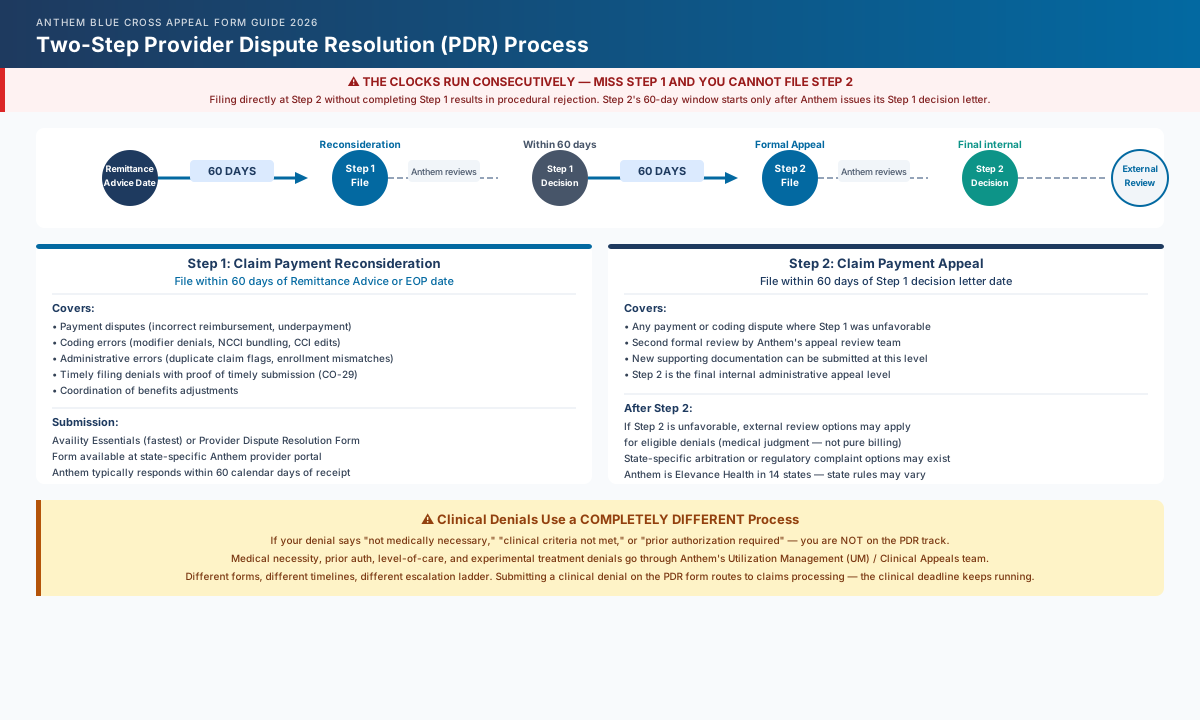
Understanding Anthem's Two-Step Dispute Process
Anthem separates provider disputes into two distinct internal review steps. Filing in the wrong step, or skipping Step 1 entirely, is one of the most common errors that results in a procedurally denied appeal.
Step 1 — Claim Payment Reconsideration
This is the first internal review. It covers:
- Payment disputes (incorrect reimbursement, bundling errors, coordination of benefits adjustments)
- Coding disputes (modifier denials, claim edit errors, NCCI bundling)
- Administrative processing errors (duplicate claim flags, enrollment mismatches)
- Timely filing denials where you have documentation of timely submission
Reconsideration must be filed within 60 calendar days of the date on your Remittance Advice (RA) or Explanation of Payment (EOP). Anthem will typically notify you of its Step 1 decision within 60 calendar days of receiving the request.
Step 2 — Claim Payment Appeal
This is the second internal review, available only after Step 1 is complete. If you disagree with the reconsideration outcome, you may escalate to a formal appeal. This step must be filed within 60 calendar days of the date on the Step 1 decision letter.
The Clocks Run Consecutively
The Step 1 and Step 2 deadlines run back-to-back — Step 2's 60-day window does not start until Anthem issues its Step 1 decision. However, if you miss the Step 1 window entirely, you cannot skip to Step 2. Both deadlines matter.
Clinical Track (Medical Necessity and Prior Authorization Denials)
Clinical denials — medical necessity, prior authorization, experimental treatment, level-of-care reviews — follow a different escalation path than payment disputes. These go through Anthem's Utilization Management (UM) or Clinical Appeals team, not the standard Claims Disputes process. The forms, timelines, and escalation ladder differ.
If your denial reason codes include "not medically necessary," "clinical criteria not met," or "prior authorization required," you are on the clinical track. For a full walkthrough of clinical appeals, see our How to Appeal Anthem Blue Cross Denials 2026.
The Anthem Provider Dispute Resolution Form
Anthem's primary form for payment disputes and coding disagreements is the Provider Dispute Resolution Request form, available through:
Turn this denial into a review-ready draft.
Muni prepares a payer-specific appeal, policy citations, and an evidence checklist. Your team reviews and submits it.
- Availity Essentials (Anthem's preferred portal) — the form is embedded in the submission workflow
- State-specific Anthem provider portals — search "provider dispute resolution form" in the forms library for your state
- Anthem's provider services line — they can mail or fax the form to your practice
When submitting through Availity, the portal generates the dispute documentation automatically based on your selections. You do not need to separately download and attach the form for online submissions.
For fax and mail submissions, the form is required without exception. Anthem's provider dispute documentation confirms that submissions received without the completed form will not be processed. The denial window continues running while Anthem waits for the resubmission.
Clinical vs. Payment Forms
The Provider Dispute Resolution form is for payment and coding disputes. Clinical appeals (medical necessity, PA denials) require a separate appeal letter with supporting clinical documentation. Using the wrong form for a clinical denial is a common error that results in the dispute being routed to the wrong processing team.
How to Submit via Availity (Recommended)
Availity Essentials is Anthem's primary submission channel for provider disputes. Submissions through Availity receive a real-time confirmation and tracking number, which serves as your proof of timely filing.
Step 1: Log in to Availity Essentials
Go to availity.com and log in with your organization's credentials. Availity registration is free and does not require Anthem's prior approval. If your practice is not registered, the enrollment process typically takes 24-48 hours.
Step 2: Navigate to Claim Disputes
From the main dashboard, select Claims & Payments. Look for Disputes, Claim Payment Reconsideration, or Appeal a Claim depending on your organization's Availity configuration. The exact label varies by Availity version.
Step 3: Search for the denied claim
Enter the claim number from your RA or EOP. Availity will pull the claim details automatically. Select Dispute This Claim or the equivalent action for the claim line in question.
Step 4: Select the dispute reason
Choose the reason category that matches your denial:
- Incorrect payment amount
- Claim was denied in error
- Bundling or editing dispute
- Coordination of benefits correction
- Timely filing — documentation attached
Step 5: Upload supporting documentation
Attach your RA, the original claim, any modifier documentation, and supporting records as PDFs. Availity accepts combined PDF uploads; keep individual attachments under 10 MB.
Step 6: Submit and record your confirmation number
After submitting, the portal generates an onscreen confirmation with a Reference or Case Number. This is your proof of timely filing. Save it immediately.
How to Submit by Fax or Mail
For practices that prefer paper submission or need to attach voluminous documentation, fax and mail are accepted channels. The Provider Dispute Resolution form must be completed before faxing or mailing.
Fax submission: Fax numbers vary by state and plan type. Locate the correct fax number for your Anthem affiliate on your state's Anthem provider portal under the Claims Disputes or Provider Services section. Fax without first checking the state-specific number is the most common submission routing error for Anthem mail-in disputes.
Mail submission: Anthem's mailing addresses for provider dispute resolution are state-specific. As a reference point, California disputes are submitted to:
Anthem Blue Cross
P.O. Box 60007
Los Angeles, CA 90060-0007
For other states, check your Anthem provider manual or the state-specific provider portal at providers.anthem.com/[your-state]-provider. USPS Certified Mail with Return Receipt is strongly recommended for all paper submissions — it provides a timestamped delivery record that is accepted by Anthem as proof of timely filing if the submission is later contested.
State-Specific Addresses Matter
Anthem operates independently in each state. Sending a dispute to the California address when you are contracted in Ohio will delay processing and potentially restart the deadline clock. Always verify the correct address for your specific state network.
Submission Channels at a Glance
| Channel | Form Required | Deadline Window | Best For | Key Note |
|---|---|---|---|---|
| Availity Essentials | Auto-generated (no download needed) | 60 days from RA date | All disputes — preferred channel | Real-time confirmation number |
| Fax | Required — must attach before sending | 60 days from RA date | Urgent submissions with paper documentation | Verify state-specific fax number first |
| Required — must attach before mailing | 60 days from RA date | High-volume documentation bundles | Use USPS Certified Mail with Return Receipt | |
| Verbal (Provider Services) | Not required — document the call | 60 days from RA date | Simple reconsiderations only | Always follow up in writing within 24h |
Verbal submissions via Anthem's Provider Services line (see our Anthem provider phone directory for the current state-specific number) are accepted for Step 1 reconsiderations but are not recommended as the primary channel. Without a written record, proving timely submission in a later dispute is difficult. If you call, document the representative's name, employee ID, and call date, and follow up with a written confirmation through Availity or fax.
2026 Changes: CMS-0057-F and Medicare Advantage Disputes
Anthem Medicare Advantage plans are now subject to the CMS Interoperability and Prior Authorization Final Rule (CMS-0057-F), which became operationally effective January 1, 2026. The rule changes two things that directly affect how you dispute MA claim and PA denials:
1. PA decision timeframes
Standard prior authorization requests must receive a decision within 7 calendar days. Expedited requests (where the standard timeline could seriously jeopardize health) must receive a decision within 72 hours. Previously, many MA plans took up to 14 days for standard decisions.
2. Patient-specific denial reasons required
Anthem MA plans can no longer issue generic denial language. Each denial must include a specific, patient-level clinical reason for the determination. This change significantly improves your ability to draft a targeted appeal — use the specific denial reason cited to locate the corresponding Anthem Clinical Policy or InterQual criterion and respond directly to the stated reason in your dispute letter.
If you receive an Anthem MA denial after January 1, 2026, that does not include a specific clinical reason, that is a regulatory violation you can reference in your escalation to the appeal step.
MA Escalation After Step 2
If Anthem's Step 2 MA appeal does not resolve your denial, you have the right to escalate to an Independent Review Organization (IRO) under 45 CFR § 147.136. Anthem is required to provide IRO access information in the Step 2 decision letter. For a full breakdown of the federal external review process, see our Independent Review Organization Appeal Guide 2026.
Anthem vs. Other BCBS Affiliates: Key Differences
The Blue Cross Blue Shield federation operates as independent entities by state. Anthem (operating in CA, CO, CT, GA, IN, KY, ME, MO, NH, NV, NY, OH, VA, WI) is the Elevance Health network. Other affiliates — BCBS NC, BCBS TX (HCSC), Florida Blue, Premera, Highmark — run their own processes.
Turn this denial into a review-ready draft.
Muni prepares a payer-specific appeal, policy citations, and an evidence checklist. Your team reviews and submits it.
| Affiliate | Step 1 Window | Availity Required? | Notable Difference |
|---|---|---|---|
| Anthem (Elevance Health states) | 60 days from RA date | Preferred channel | Two-step process: Reconsideration → Appeal |
| Florida Blue (BCBS FL) | 180 days from EOP date | NaviMedix portal + Availity | Separate guide: florida-blue-appeal-form-guide-2026 |
| BCBS NC | 365 days from DOS | Availity ICR preferred | Longer initial filing window vs. Anthem |
| Premera Blue Cross (WA/AK) | 365 days from DOS | Availity preferred | Separate guide: premera-blue-cross-timely-filing-limits-2026 |
| Highmark (PA/DE/WV) | 180 days from EOP date | Availity NaviNet preferred | NaviNet portal; navinet.net for access |
For Florida Blue-specific form guidance, see the Florida Blue Appeal Form Guide 2026. For Premera-specific deadlines, see our Premera Blue Cross Timely Filing Limits 2026.
For a full cross-affiliate BCBS deadline reference, the BCBS Timely Filing Limits 2026 guide covers claim submission and appeal windows for seven major affiliates side by side.
Common Anthem Dispute Errors to Avoid
- Missing the form on fax/mail submissions. Anthem's documentation confirms that submissions received without the completed Provider Dispute Resolution form are not processed. The deadline continues to run.
- Using the payment dispute form for a clinical denial. Clinical appeals (medical necessity, PA denials) require a separate letter with supporting clinical documentation routed to Anthem's clinical appeals team.
- Submitting to the wrong state address or fax number. Anthem operates state-by-state; the California fax and mailing address do not route to Ohio or Virginia processing.
- Skipping Step 1 and filing directly at Step 2. Anthem requires the two-step sequence. A Step 2 appeal submitted without a Step 1 reconsideration decision on file will be returned as procedurally premature.
- No confirmation number from Availity. If you close the browser before recording the case number, you lose your timestamped proof of filing. The Availity portal does send a confirmation email in most configurations — verify your account settings.
How Muni Appeals Helps With Anthem Disputes
Managing Anthem disputes across multiple states means tracking different fax numbers, address variations, timely filing windows, and two-step deadlines simultaneously. For independent practices handling a volume of Anthem denials, consistency and documentation discipline are the hardest parts to maintain at scale.
Muni Appeals organizes the uploaded Anthem denial, surfaces Step 1 and Step 2 deadline risk and likely state routing, and compiles a review-ready documentation package. Billing staff verifies and calendars both deadlines, confirms the current channel, and submits directly.
For practices with active Anthem denial volume, the two-step structure means every claim that clears Step 1 unfavorably still has a second internal path before external escalation. Maintaining that step-by-step discipline is where Muni Appeals adds consistency.
Frequently Asked Questions
Where can I find the Anthem Provider Dispute Resolution form?
The form is available through Availity Essentials (embedded in the dispute workflow), your state-specific Anthem provider portal at providers.anthem.com/[your-state]-provider, or by contacting Anthem Provider Services directly to request a copy. For fax and mail submissions, the form is required before Anthem will process your dispute.
How long does Anthem take to process a claim payment dispute?
Anthem typically notifies providers of the reconsideration (Step 1) decision within 60 calendar days of receiving the completed submission. Step 2 appeal decisions follow a similar timeline after receipt of the escalation request.
Can I submit an Anthem dispute by email?
No. Anthem does not accept provider dispute submissions by email. The accepted channels are Availity Essentials, fax (state-specific number), mail, or verbal submission through Provider Services. For a step-by-step guide to the Availity submission process, see the submission walkthrough above.
What happens if I miss Anthem's 60-day reconsideration deadline?
Missing the 60-day reconsideration window generally forfeits your right to internal dispute review for that claim. There is no standard grace period. If you have documentation of a delay caused by Anthem (for example, failure to provide the required information in the denial notice), that is a procedural argument you can make in writing to Provider Services, but this is not a guaranteed path to an extension.
Does Anthem's two-step process apply to Medicare Advantage clinical denials?
The two-step Claims Dispute process primarily applies to payment and coding disputes. Medicare Advantage clinical denials (medical necessity, prior authorization) follow the CMS-defined 5-level MA appeal ladder: Anthem Level 1 → Anthem Level 2 → Independent Review Entity (IRE — C2C Innovative Solutions as of May 1, 2026; Maximus Federal Services held the contract through April 30, 2026) → Office of Medicare Hearings and Appeals (OMHA) → Medicare Appeals Council. For a full breakdown of the MA appeal process and Anthem denial type routing, see the Anthem Denied Claim Guide 2026.
How is the Anthem process different from Florida Blue?
Florida Blue (BCBS Florida) operates independently from Anthem. Florida Blue uses the NaviMedix portal as its primary submission channel, has a 180-day initial filing window (vs. Anthem's 60-day reconsideration window), and routes appeals through a different clinical review structure. For Florida Blue-specific guidance, see the Florida Blue Appeal Form Guide 2026.
Can I submit a verbal reconsideration by phone?
Yes — Anthem accepts verbal reconsiderations for Step 1 through Provider Services. However, verbal submissions carry risk: without a written record, proving timely filing is difficult if the submission is later disputed. If you submit verbally, document the representative's name, employee ID, date, and time of the call immediately after hanging up, and follow up with a written confirmation through Availity or fax within 24 hours.
Ready to Streamline Anthem Appeal Submissions?
Anthem's two-step dispute structure is one of the more process-intensive in the BCBS family — two separate deadlines, state-specific routing, and a hard separation between payment disputes and clinical appeals. Independent practices billing across multiple Anthem states face additional complexity tracking different forms, fax numbers, and addresses for each network.
Get Started:
- Track Step 1 and Step 2 deadlines automatically from the RA date
- Organize documentation packages for each submission type and channel
- Maintain state-specific routing details for Anthem and other BCBS affiliates
- Built-in audit trail for proof of timely filing at every step
This guide reflects 2026 Anthem Blue Cross Blue Shield provider dispute resolution procedures. State requirements, affiliate-specific processes, and individual provider contract terms may vary. Anthem operates independently in each state through the Elevance Health network. Florida Blue, Premera, Highmark, BCBS NC, and other BCBS affiliates use separate processes — consult affiliate-specific guides for those networks.