

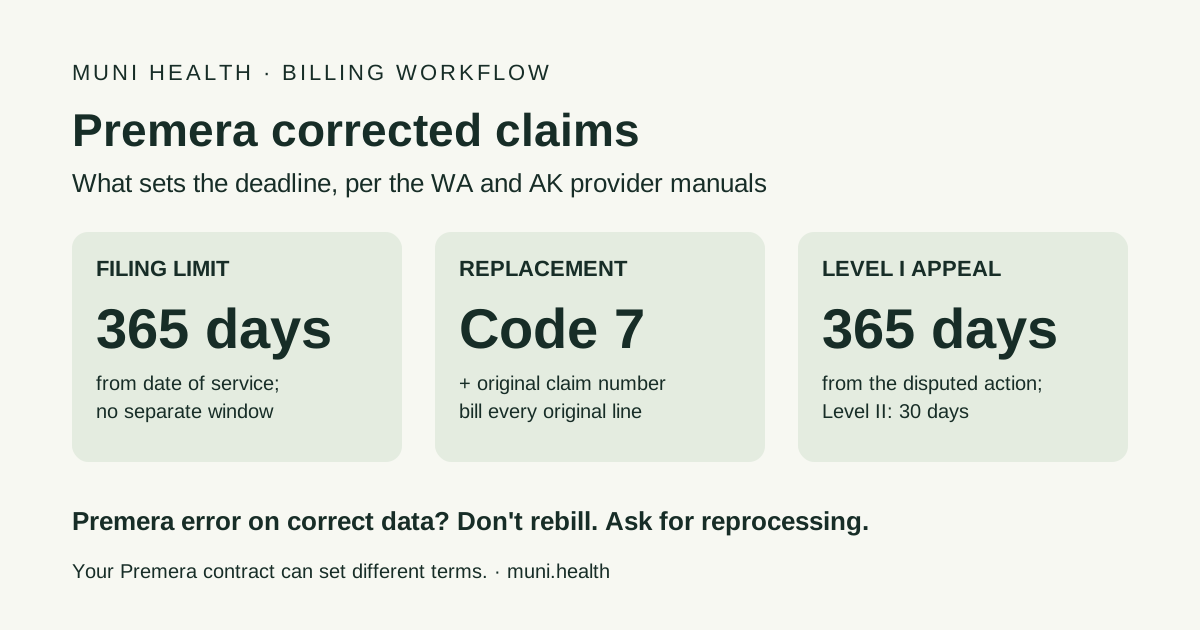
Premera Blue Cross does not publish a separate corrected-claim deadline. Its Washington and Alaska provider manuals set one filing rule: submit claims ideally within 60 calendar days, but no later than 365 calendar days from the date of service, and refer to your contract for more. Since no fresh clock is published for corrections, the safe plan is to get the corrected claim accepted inside that same 365-day window. Send it as a full replacement with frequency code 7 and the original Premera claim number (837 loop 2300 REF F8, or Box 22 on paper). Bill every original line, or the claim rejects. If Premera processed your correct claim wrong, do not rebill. That is a reprocessing request or a Level I appeal, due within 365 days of the action you are disputing.
What is Premera's corrected claim deadline?
Premera's manual gives no corrected-claim window of its own. The only filing limit it states is 365 calendar days from the date of service, plus whatever your Premera contract adds.
The "Timely claims submission" section of Premera's Washington claims submission and payments manual asks for claims within 60 calendar days of the covered service, "but no later than 365 calendar days from the date of service." It adds that for most plans Premera will deny claims received more than 12 months after the date of service, and that you should refer to your contract for more on claim submission. The Alaska version of the same manual uses the same language. Both pages were checked October 30, 2026.
The "Corrected claims" section that follows explains how to submit a correction. It does not say whether a correction gets a new clock. Treat that silence conservatively:
- Plan on 365 days from the original date of service for the corrected claim to be received, not 365 days from the remittance.
- Check your participation agreement. Premera points you there, and your contract can set different terms.
- Do not count the 60-day target as the deadline. It is a processing preference. Claims received after day 60 and within 365 days are still inside the stated limit.
For the original-claim rules by plan type, including BlueCard and FEP, see the Premera Blue Cross timely filing limits guide.
Why the conservative clock matters
A correction sent on day 340 that rejects at the front end may not get back in before day 365. Send corrections as soon as you find the error, and check the acceptance report the same day.
When should you send a Premera corrected claim?
Send one when your original claim carried wrong or missing data. Premera's manual describes the trigger as an original claim "submitted with incomplete information," such as a wrong procedure code, date of service, or diagnosis code.
A corrected claim is the right route when:
- a procedure code, modifier, or units were billed wrong;
- the date of service or place of service was wrong;
- a diagnosis code was missing or wrong; or
- the original claim left off services you rendered that day.
It is the wrong route in three cases the manual addresses:
- Premera made the processing error. The manual says that if Premera processed the original claim incorrectly, "you do not need to rebill." Call Customer Service or send a copy of the voucher with the claim highlighted, and Premera reprocesses it. Rebilling a correctly billed claim invites a duplicate denial.
- You disagree with a decision on correct data. That is a provider appeal, not a correction. The corrected claim vs. insurance appeal guide walks through the decision.
- You want to void the claim. Use frequency code 8 to void a claim billed in error, not 7.
Premera wants one professional claim per provider per day
The manual's "Fragmented or split professional billing" section requires all professional services by the same provider on the same date of service to go on one claim. If you left a service off, send a replacement with every line. Do not send the missing service alone.
How to submit a corrected claim to Premera
Use the 837 transaction with frequency code 7, the original Premera claim number, and a note explaining the change. Premera calls the 837 its preferred route for corrected claims.
| Channel | What to enter | Source |
|---|---|---|
| Electronic 837P / 837I | Frequency code 7 in loop 2300, CLM05-3; original Premera claim number in loop 2300 REF (REF01 = F8, REF02 = claim number) | Premera claims manual, "Submitting a Corrected Claim via an 837 Transaction" |
| 837 claim note (recommended) | Professional and dental: NTE01 = ADD. Facility: NTE01 = UPI. NTE02 = a short explanation, such as CORRECTED PROCEDURE CODE | Premera EDI overview and claims manual |
| Paper CMS-1500 | Box 22: frequency code 7, left justified, and the original claim number in the Original Ref. No. field. Mark the claim as corrected and attach the Corrected Claim - Standard Cover Sheet | Premera claims manual, "Submitting a Corrected Claim on Paper" |
| UB-04 replacement | Use replacement frequency 7 with the applicable facility/service bill-type prefix; 0117 is the inpatient hospital example | Premera UB-04 billing manual |
| UB-04 late charges | Bill type 0XX5 for charges realized after the final claim was submitted | Premera UB-04 billing manual |
| Void | Frequency code 8 (837 CLM05-3 or Box 22) | Premera claims manual |
Sources: Premera's EDI overview and UB-04 billing section, both checked October 30, 2026. Premera's manual links the paper cover sheet from a Washington administrative-simplification claims guidelines page.
Three rules decide whether the correction processes:
- Bill all original lines. The manual says leaving out original lines "will cause the claim to be rejected." The replacement stands in for the whole original claim.
- Mark it as a correction. On paper, failing to show it is a corrected claim "may result in a denial as a duplicate claim." Electronically, frequency code 7 plus the original claim number does that job.
- Attach support when the change needs it. Premera's claim-suspension guidance says a rebilled claim with a different diagnosis or other change rejects if the records that support the change are not attached.
Check your software before the batch
Confirm your practice management system can send frequency code 7 with a REF F8 original claim number and an NTE note. Premera's EDI page points billing-system questions to your system vendor or clearinghouse. Test one corrected claim before you need to send a batch.
Copyable Premera corrected-claim worksheet
Use this in your practice management system or approved claim notes. Do not paste patient identifiers into a public tool.
Premera Blue Cross corrected-claim check

Plan / line of business (WA commercial / AK commercial / BlueCard / FEP / other):
Original Premera claim number (from EOP / voucher):
EOP / voucher date:
Date of service:
365-day limit from date of service (calendar date):
Contract filing terms checked (Y/N, section #):

Is this a correction? (our billed data was wrong)
[ ] Procedure code, modifier, or units
[ ] Date of service or place of service
[ ] Diagnosis code
[ ] Services left off the original claim
Stop and use another route if:
[ ] Premera processed correct data wrong -> call Customer Service or send highlighted voucher; do not rebill
[ ] Billed data was right, decision disputed -> Level I provider appeal
[ ] Claim billed in error -> frequency code 8 (void)

Electronic (837):
Frequency code 7 in CLM05-3 (Y/N):
REF F8 with original claim number (Y/N):
NTE note (ADD professional / UPI facility):
All original lines included (Y/N):
Supporting records attached if diagnosis or other data changed (Y/N):

Paper (CMS-1500):
Box 22 code 7 + original claim number (Y/N):
Marked as corrected claim (Y/N):
Corrected Claim - Standard Cover Sheet attached (Y/N):

Facility (UB-04):
Applicable facility/service bill-type prefix with replacement frequency 7:
(0117 is the inpatient hospital example; do not use it for every facility.)
Late-charge bill type, if applicable under the UB-04 instructions:

Proof and follow-up:
Clearinghouse / Availity acceptance saved (Y/N, date):
Level I appeal deadline (365 days from disputed action):
Follow-up date and owner:
Skip the blank template. Start with a review-ready draft.
Use the template as guidance, or let Muni prepare a payer-specific draft for your team to verify, sign, and submit.
First 3 appeals free, then $20 per appeal. Start with your denial letter or EOB and available records. No meeting or clearinghouse connection required.
Does a corrected claim stop Premera's appeal clock?
Nothing in the manual says it does, so do not count on it. The manual covers corrected claims and provider appeals in separate sections, and the appeal deadline has its own trigger.
Prepare this appeal packet with your team.
Draft the appeal, coordinate missing documents, and approve the reviewed packet. Keep your clearinghouse; your practice checks deadlines and submits through the payer’s accepted channel.
First 3 appeals free, then $20 per appeal. Start with your denial letter or EOB and available records. No meeting or clearinghouse connection required.
The appeal rules in the Premera claims manual are:
| Step | Deadline | Premera decision time |
|---|---|---|
| Level I provider appeal | Within 365 days following the action that prompted the dispute | Within 30 days |
| Level II provider appeal (billing issues only) | In writing within 30 calendar days of the Level I decision | Within 15 days of acceptance |
| Non-binding mediation | Within 30 days of the plan decision | Not stated |
Level I needs four things: a detailed description of the disputed issue, your position, all supporting evidence including medical records, and the resolution you want. Premera returns incomplete appeals with a request for information. Send appeals to Physician and Provider Appeals, P.O. Box 91102, Seattle, WA 98111-9202, or fax 425-918-5592.
The manual also states that the provider appeals process "does not apply to FEP, BlueCard Home Claims, or Medicare Supplement plans." For those, follow the program's own route. See the BCBS FEP claim denial guide or the BlueCard provider appeal guide.
Level II is short
Level I gives you 365 days. Level II gives you 30 calendar days from the Level I decision and covers billing issues only. Calendar Level II the day the Level I decision arrives.
If Premera denies the corrected claim as late
Treat it as a proof problem first. Show when Premera or your clearinghouse accepted the original claim and the correction.
Pull the 277CA or Availity acceptance for both submissions, the original EOP or voucher, and your 365-day calculation from the date of service. If your contract sets different filing terms, cite the section. Then file a Level I appeal with the four required elements. The Premera appeal letter template has the letter, and the Premera appeal form guide covers which form goes with which dispute.
A rejection is not a filing. Premera's manual says invalid claims are reported back to the provider with rejection details, and a correction that rejected never started processing. Work rejections the same day so the 365-day window is not used up while a claim sits in an error queue.
If the correction lowers what Premera paid
A replacement that reduces the allowed amount can lead to an overpayment recovery. Premera's manual asks for refunds within 60 days of the initial notice to avoid offsets against future payments. For carriers subject to Washington law, RCW 48.43.600 currently limits written refund requests to 24 months after payment (30 months for coordination of benefits). Amendments shorten that window starting in 2027 for mental health and substance use services, and generally in 2028.
How Premera compares with other payers
Premera ties corrections to its one stated filing limit instead of publishing a separate corrected-claim window. That is close to how Florida Blue handles corrections, but the numbers and fields differ. Rules learned on one Blue plan do not carry over.
For other Blue plans, see the BCBS corrected claim timely filing guide. The multi-payer corrected claim guide compares the major commercial payers side by side. For every other Premera denial type, start with the Premera denied claim guide.
Frequently Asked Questions
What is Premera Blue Cross's timely filing limit for corrected claims?
Premera does not publish a separate one. Its provider manuals say claims should be submitted within 60 calendar days but no later than 365 calendar days from the date of service, and to refer to your contract for more. Plan for the corrected claim to be received within that same 365-day window unless your contract says otherwise.
What frequency code does Premera use for a corrected claim?
Use frequency code 7 (replacement of prior claim). Electronically it goes in loop 2300, CLM05-3, with the original Premera claim number in REF F8. On a paper CMS-1500, enter 7 and the original claim number in Box 22. Facility replacements retain the applicable facility/service bill-type prefix and use replacement frequency 7. Premera's 0117 example is for inpatient hospital billing.
Do I need a cover sheet for a Premera corrected claim?
Only on paper. Premera's paper instructions ask you to attach a completed Corrected Claim - Standard Cover Sheet. The 837 instructions use frequency code 7, the original claim number, and a recommended NTE note instead.
Can I send only the corrected line to Premera?
No. Premera's manual says to bill all original lines, and leaving any out causes the claim to reject. Professional services by the same provider on the same date also belong on one claim.
Should I rebill if Premera processed my claim incorrectly?
No. The manual says you do not need to rebill when Premera processed the original claim incorrectly. Contact Customer Service or send a copy of the voucher with the claim highlighted. If you still disagree after reprocessing, file a Level I appeal within 365 days of the action you are disputing.
Does a Premera corrected claim extend the appeal deadline?
The manual does not say it does. Track the Level I appeal deadline (365 days following the disputed action) separately from the correction, and calendar the 30-day Level II window when a Level I decision arrives.
Catch the deadline before you resubmit
The hard part of a Premera correction is not frequency code 7. It is knowing whether the claim needs a correction, a reprocessing request, or an appeal before the 365-day window runs out.
When a Premera denial has already arrived, Muni Appeals reads the uploaded denial and EOP, flags deadline risk, and drafts the appeal with a supporting-document checklist. Your billing team confirms the controlling deadline and submission route, then files.
This guide reflects Premera Blue Cross's Washington and Alaska claims submission and payments manuals, its UB-04 billing section, and its EDI overview, all checked October 30, 2026, plus RCW 48.43.600 as published on that date. Your Premera participation agreement, the member's plan, and any notice on the EOP can set different terms. Confirm plan-specific rules with Premera provider services.