

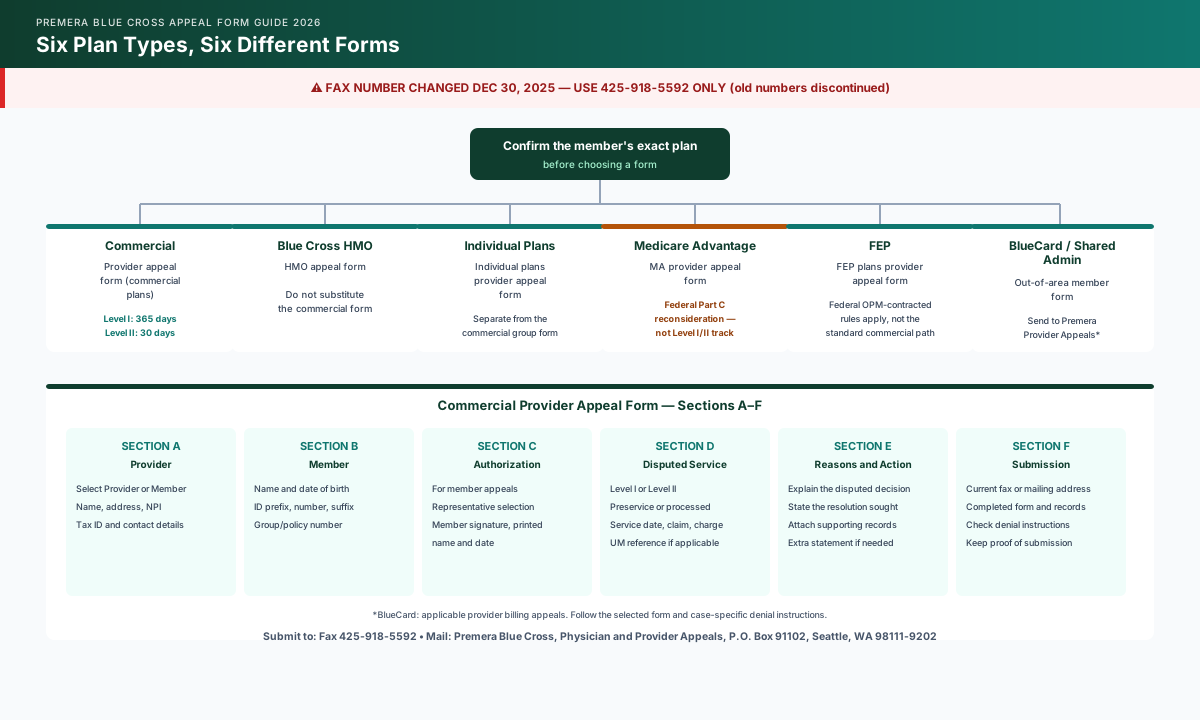
Premera Blue Cross uses six separate plan-specific provider appeal forms — commercial, HMO, individual, Medicare Advantage, Federal Employee Program (FEP), and BlueCard/Shared Admin — all listed on Premera's current provider forms page. The commercial form has six sections, A–F: provider information and appeal-party selection, member information, member authorization, disputed service details, reasons and requested action, and submission instructions. Its current submission instructions list fax 425-918-5592 or mail to Premera Blue Cross, Appeals Department, P.O. Box 91102, Seattle, WA 98111-9202. Confirm the selected form and case-specific denial instructions before sending.
Which Premera Appeal Form Do You Need?
Premera does not use one universal appeal form. It publishes a separate form for each plan type, and using the wrong one is one of the most common reasons a Premera appeal gets delayed or returned. Confirm the member's exact plan before you start filling anything out.
| Member's Plan | Form to Use | Notes |
|---|---|---|
| Premera commercial | Premera commercial plans provider appeal form | Select Level I or Level II and preservice vs. already-processed on the form itself |
| Premera Blue Cross HMO | Premera Blue Cross HMO appeal form | Do not substitute the commercial form |
| Premera individual plans | Premera individual plans provider appeal form | Separate from the commercial group form |
| Premera Medicare Advantage | Premera Medicare Advantage plans provider appeal form | Follow the Part C reconsideration instructions on the denial notice |
| Federal Employee Program (FEP) | FEP plans provider appeal form | The standard commercial process does not apply to FEP claims |
| BlueCard / Shared Admin (out-of-area member) | BlueCard and Shared Admin provider appeal form | For applicable contracted-provider billing appeals, submit to Premera Physician and Provider Appeals; follow the form and case-specific denial instructions |
All six forms are listed on Premera's current provider forms page. Use that page rather than a saved PDF from a prior appeal — Premera revises form versions, and an outdated form can be rejected on receipt.
Premera Changed Its Fax Number
Effective December 30, 2025, Premera consolidated all appeal submissions onto a single fax number, 425-918-5592. The former numbers — 425-918-4133 and 800-557-7581 — are discontinued. If your practice has an old fax number saved from a prior appeal, update it before submitting.
If you have not yet identified the denial type or confirmed which appeal track applies, start with the Premera Blue Cross appeal guide, which walks through the broader filing timeline and Level I/II deadlines. This guide assumes you have already reached that point and need to complete the form itself correctly.
How to Fill Out the Premera Provider Appeal Form, Section by Section
The commercial plans provider appeal form (017953) has six labeled sections, A–F. The walkthrough below follows that form; other plan-specific forms may have different fields and instructions.
Section A: Provider Information
First select whether the appeal is for the Provider or Member. Then enter the provider or facility name, address, NPI, Tax ID, and contact name, phone, and fax. Check these identifiers against your practice records.
Section B: Member Information
Enter the member's first and last name, date of birth, and group/policy number. The member ID field on Premera's form is split into three parts — prefix, ID number, and suffix — and all three are required. A missing alpha prefix is one of the most frequent completion errors on this form, because it's easy to copy only the numeric portion from an EOP.
Section C: Member Appeal Authorization
This section only applies when the dispute is a member benefit appeal — a pre-service denial, medical-necessity benefit denial, or a request to reduce the member's cost share — rather than a provider payment dispute over the amount payable to the practice. The form asks you to check whether the appealing party is the "Provider listed in Section A" or "Someone else," and requires the member's signature and date authorizing the practice to appeal on their behalf.
When You Can Skip Section C
A straight provider payment appeal — a coding dispute, a bundling edit, or a timely-filing argument over the amount Premera owes the practice — does not require member authorization. Section C is specifically for benefit appeals filed by the practice on the member's behalf. For the fuller distinction between these two appeal types and ready-to-use letter language for each, see the Premera appeal letter template guide.
Section D: What Are You Appealing?
This section identifies the request and disputed service:
- Level I or Level II — Level I is the initial appeal; Level II is only available after a Level I decision, and per Premera's provider manual, Level II appeals are limited to billing-related issues and must be filed within 30 calendar days of the Level I decision.
- Preservice denial or claim/service already processed — select the option matching your denial type.
- Date(s) of service, claim number, and total charge — taken directly from the EOP or denial notice.
- Utilization management reference number, if the denial notice cites one.
Section E: Reasons and Requested Action
Use the two narrative fields to identify the decision you dispute and the resolution you seek. Reference the denial notice, explain your supporting evidence, and attach a separate statement if needed.
Section F: Submission Instructions
Send the completed form and supporting records using the fax or mailing instructions printed in Section F. Verify those instructions against the current form and any case-specific directions on the denial notice, and retain proof of submission.
Field-by-Field Completion Checklist
Use this checklist while completing the commercial provider appeal form. It mirrors the form's actual section order so you can work through it top to bottom without missing a required field.
PREMERA BLUE CROSS PROVIDER APPEAL FORM — COMPLETION CHECKLIST
(Commercial Plans Provider Appeal Form — confirm this is the correct form for the member's plan)

SECTION A — PROVIDER INFORMATION
☐ Select who the appeal is for: Provider OR Member
☐ Provider/facility name (exactly as credentialed with Premera)
☐ Address, city, state, ZIP
☐ NPI
☐ Tax ID
☐ Contact name, phone, fax

SECTION B — MEMBER INFORMATION
☐ Member first and last name
☐ Date of birth (MM/DD/YYYY)
☐ Member ID — prefix + ID number + suffix (all three; a missing prefix is a common rejection reason)
☐ Group/policy number

SECTION C — MEMBER APPEAL AUTHORIZATION
(Skip for a straight provider payment appeal. Required whenever the practice appeals a member benefit denial on the member's behalf.)
☐ Check "Provider listed in Section A" OR "Someone else"
☐ If someone else: name, phone, address, city, state, ZIP
☐ Member signature and date
☐ Member printed name

SECTION D — WHAT ARE YOU APPEALING?
☐ Level I or Level II (Level II only after a Level I decision; billing issues only; file within 30 days of that decision)
☐ Preservice denial OR claim/service already processed
☐ Date(s) of service
☐ Claim number (from the EOP/denial notice)
☐ Total charge
☐ Utilization management reference number (if cited on the denial)

SECTION E — REASONS AND REQUESTED ACTION
☐ Identify the decision you dispute and explain why it should change
☐ State the specific resolution requested; attach a statement if needed

SECTION F — SUBMISSION INSTRUCTIONS
☐ Check the current form and case-specific denial instructions
☐ Send the completed form and supporting documents using the listed fax or mailing address

BEFORE YOU SEND
☐ Attach the EOP/EOB or denial notice
☐ Attach medical records or coding documentation supporting the requested action
☐ Attach member authorization signature if this is a member appeal
☐ Confirm you used the form for the member's actual plan type — commercial, HMO, individual, Medicare Advantage, FEP, and BlueCard are six different forms
☐ Fax to 425-918-5592 or mail to Premera Blue Cross, Physician and Provider Appeals, P.O. Box 91102, Seattle, WA 98111-9202
☐ Keep a copy of the completed form and proof of transmission (fax confirmation or certified mail receipt)
Skip the blank template. Start with a review-ready draft.
Use the template as guidance, or let Muni prepare a payer-specific draft for your team to verify, sign, and submit.
First 3 appeals free, then $20 per appeal. Start with your denial letter or EOB and available records. No meeting or clearinghouse connection required.
Where to Submit the Completed Form
| Channel | Address / Number | Notes |
|---|---|---|
| Fax | 425-918-5592 | Premera's single unified appeals fax as of December 30, 2025. Former numbers 425-918-4133 and 800-557-7581 are discontinued. |
| Premera Blue Cross, Physician and Provider Appeals, P.O. Box 91102, Seattle, WA 98111-9202 | Send via certified mail with return receipt to document timely filing. | |
| AppealsDepartmentInquiries@Premera.com | For status questions only — Premera does not accept appeal submissions by email. |
Prepare this appeal packet with your team.
Draft the appeal, coordinate missing documents, and approve the reviewed packet. Keep your clearinghouse; your practice checks deadlines and submits through the payer’s accepted channel.
First 3 appeals free, then $20 per appeal. Start with your denial letter or EOB and available records. No meeting or clearinghouse connection required.
Level I and Level II Deadlines Run Separately
Per Premera's provider manual, a Level I appeal must be submitted within 365 calendar days of the disputed action, and a Level II appeal must be submitted within 30 calendar days of the Level I decision. Both levels are mailed or faxed to the same address and fax number. For the full deadline breakdown across appeal types and claim submission, see Premera Blue Cross Timely Filing Limits 2026.
Medicare Advantage, FEP, and BlueCard Use Different Forms — Not Just a Different Address
Premera's Medicare Advantage provider appeal form follows a similar section layout to the commercial form — provider information, member information, member appeal authorization, and appeal details — but it routes through the federal Part C reconsideration process rather than Premera's internal Level I/Level II track. If the MA plan's reconsideration decision is unfavorable to the enrollee in whole or in part, Premera must send the case file and decision for automatic review by the Part C Independent Review Entity. Follow the instructions on the organization-determination denial notice rather than the commercial Level I/II timeline.
FEP and BlueCard/Shared Admin claims use dedicated forms. FEP follows federal OPM-contracted plan rules. The BlueCard/Shared Admin form (030845) directs applicable contracted-provider billing appeals to Premera Physician and Provider Appeals, at the mailing address above or fax 425-918-5592. The home plan's role in benefit adjudication does not make it the default submission destination for this form. Its process excludes BlueCard Home Claims; member-liability appeals require authorization from the member's plan. Follow the selected form and case-specific denial instructions.
Common Mistakes When Filing a Premera Appeal Form
- Using the commercial form for every plan type. HMO, individual, Medicare Advantage, FEP, and BlueCard claims each have a dedicated form on Premera's current forms page.
- Leaving off the member ID prefix. Premera's member ID has three parts — prefix, number, and suffix — and the prefix is required even though it's often left off an EOP reference.
- Skipping member authorization on a benefit appeal. If the practice is appealing a pre-service or medical-necessity benefit denial on the member's behalf, Section C's signature is required, not optional.
- Filing Level II before Level I is decided. Level II is only available after Premera issues a Level I decision, and it's limited to billing-related issues.
- Faxing to an old number. The 425-918-4133 and 800-557-7581 fax numbers are discontinued as of December 30, 2025; use 425-918-5592.
How Muni Appeals Helps Draft a Premera Appeal Letter
Muni Appeals generates an editable appeal-letter draft from the uploaded denial and supporting records. Billing staff reviews the draft, chooses and completes the current Premera form, obtains member authorization where required, and verifies the submission instructions before sending the appeal.
Frequently Asked Questions
Where do I find Premera's provider appeal forms?
All six plan-specific forms — commercial, HMO, individual, Medicare Advantage, FEP, and BlueCard/Shared Admin — are listed on Premera's current provider forms page. Use the current page rather than a saved copy, since Premera revises form versions.
What is Premera's current appeals fax number?
425-918-5592, effective December 30, 2025. This replaced the former numbers 425-918-4133 and 800-557-7581, which are now discontinued.
Do I need the member's signature to file a Premera appeal?
Only for a member benefit appeal — a pre-service denial, medical-necessity benefit denial, or cost-share dispute — filed by the practice on the member's behalf. A straight provider payment dispute over the amount payable to the practice does not require Section C's member authorization signature.
What is the difference between a Level I and Level II Premera appeal?
A Level I appeal is the initial appeal and must be filed within 365 calendar days of the disputed action. A Level II appeal is available only after a Level I decision, applies to billing-related issues, and must be filed within 30 calendar days of that decision.
Can I use the commercial appeal form for a Medicare Advantage denial?
No. Premera's Medicare Advantage form routes through the federal Part C reconsideration process, which is distinct from the commercial Level I/Level II internal appeal track. Use the Medicare Advantage-specific form and follow the instructions in the organization-determination denial notice.
What happens if I use the wrong Premera appeal form?
Using a form for the wrong plan type typically delays processing rather than resulting in an outright rejection, since it may be routed to the wrong internal team before anyone catches the mismatch. Confirming the member's exact plan type before selecting a form avoids this delay entirely.
Get the Form Right the First Time
Premera's six plan-specific forms and section-by-section field requirements are straightforward once you know which form applies and what each field expects — the friction is almost always a wrong-form or missing-field problem, not a substantive one.
Get Started:
- Generate an editable appeal-letter draft from the denial and supporting records
- Review the draft's facts, reasoning, and requested action
- Select and complete the current Premera form, including any required member authorization
- Verify and calendar the applicable deadline, then submit using the controlling instructions
This guide reflects Premera Blue Cross provider appeal form structure and submission requirements verified against Premera's provider forms page and provider manual as of September 14, 2026. Form versions, section labels, and routing requirements may change — confirm the current form and instructions on Premera's provider forms page before filing. This information is for administrative purposes and is not legal advice.