

For a processed claim, UMR's Post-Service Appeal Request Form (UMF0010, revised July 2026) has 13 fields and a mailing address: UMR – Claim Appeals, P.O. Box 30546, Salt Lake City, UT 84130-0546. Providers can also request review through umr.com. UMR's post-service portal FAQ (UM1983, June 2026) distinguishes an inquiry without a formal appeal from a formal appeal on the member's behalf, which requires member authorization. The electronic authorization request expires after 72 hours without a response; that is not the appeal filing deadline. Follow the denial notice and plan instructions for the correct route, representation requirements, destination, and deadline. Pre-service appeals follow their own instructions; a peer-to-peer discussion does not replace filing the formal appeal.
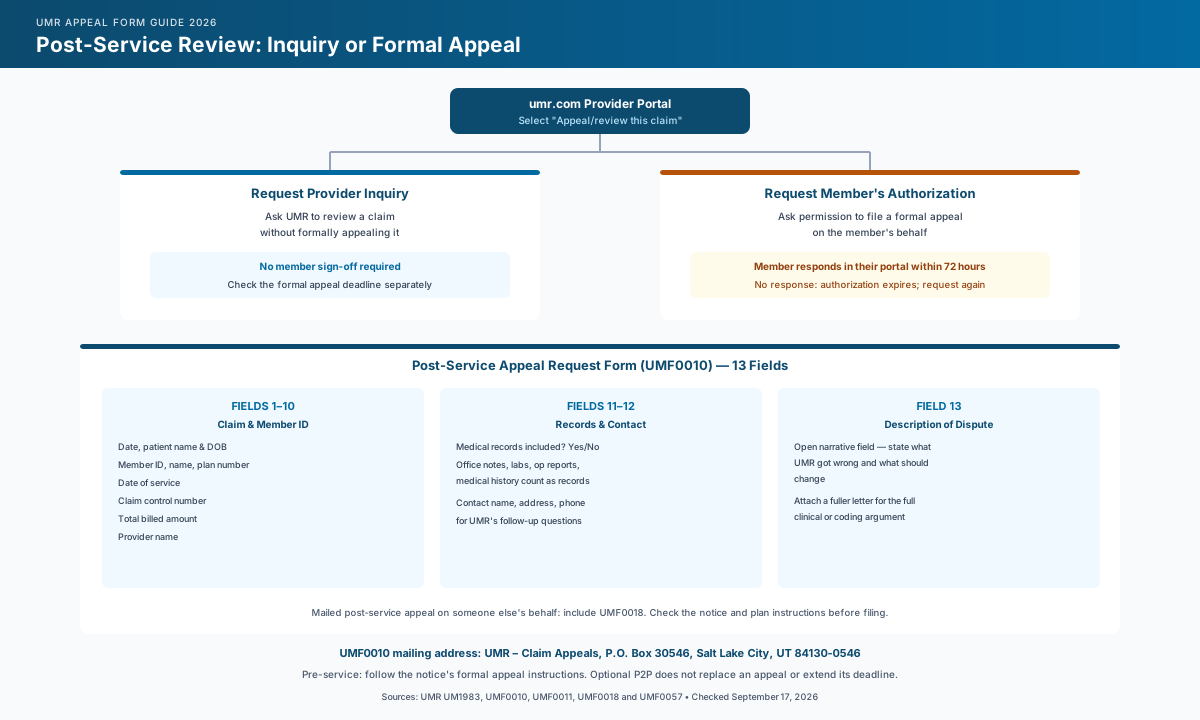
Provider Inquiry or Member Appeal? Pick the Portal Path First
Decide whether you are asking for an informal claim review or submitting a formal appeal. UM1983 defines an inquiry as a review without formally appealing; a member can appeal or authorize a provider to appeal for them. It does not assign coding, bundling, timely-filing, or medical-necessity denials to separate routes. Use the denial notice and plan instructions to decide what the case needs.
| Request Provider Inquiry | Request Member's Authorization | |
|---|---|---|
| Purpose | Review a claim without formally appealing it | Ask permission to submit a formal appeal on the member's behalf |
| Member authorization? | Not required for an inquiry | Required for this provider-initiated appeal path |
| 72-hour window | No member authorization required | Member approves or denies in their portal; an unanswered authorization request expires and must be requested again |
| Deadline check | Do not assume an inquiry preserves or extends an appeal deadline | Track the formal appeal deadline separately from the authorization request |
Track Authorization and the Appeal Deadline Separately
Tell the member to sign into their UMR portal to approve or deny the authorization request within 72 hours. If it expires, submit another authorization request. UMR says approval automatically finalizes the request and sends it to its appeals department. Check the request status and the plan's appeal deadline separately; the authorization window does not establish an extension.
Confirm the applicable deadline from the denial notice and plan documents. The UMR Timely Filing Limit 2026 guide provides additional context; verify any example against the actual plan before using it. For drafting help, see the UMR Appeal Letter Template and use only the sections that apply to the member's plan and appeal.
How to File a UMR Claim Appeal Through the Portal
UMR's provider portal walkthrough (UM1398, April 2025) describes the submission steps. Its June 2026 FAQ explains the request types and transaction tracking. These provider instructions are separate from UMF0010's recommendation to submit electronically through the member portal.
- Sign in to your secure provider account at umr.com/provider using a One Healthcare ID.
- Search for the patient using Patient search.
- Find the claim. Select the patient from the Select patient drop-down, then choose Claim/Claims appeals from the View drop-down.
- Select "Appeal/review this claim." The current FAQ says this is available after processing. If the link is missing, eligibility, processing status, or the group's portal access may be involved; contact the number on the member's ID card for help.
- Choose the request type. A pop-up explains the two paths above — pick Request Provider Inquiry or Request Member's authorization, then select the ineligible code you want reviewed and continue.
- Enter the claim dispute comments and upload supporting documents relevant to the denial. For a medical-necessity dispute, that may include clinical notes, lab results, or operative reports rather than only a bill.
- Add contact information for the person UMR should reach with questions.
- Review the request summary and submit. Save the confirmation for your own tracking.
Check That Your Supporting Documents Were Included
The portal walkthrough includes a document-upload step. Review your attachments before submitting, and follow UMR's current instructions if a file cannot be uploaded. UMF0010 says that without medical documentation, review relies on information already on file.
The UMR Post-Service Appeal Request Form (UMF0010), Field by Field
If you are filing a post-service appeal by mail, use the current UMF0010 form and check its instructions against the denial notice. The walkthrough below summarizes its 13 numbered fields; it does not assume that every portal field is identical. Find current downloads in UMR's form center.
Fields 1–10: Claim and Member Identification
Enter today's date, then verify the patient, member, plan, service, claim, billed-amount, and provider identifiers against the EOB, denial notice, and practice record.
Field 11: Medical Records Included?
A yes/no checkbox. UMR states that if no medical documentation is submitted, the review proceeds on the information already on file. Office notes, lab results, operative notes/reports, and medical history are examples of medical records.
Field 12: Contact for Questions
Give the name, address, and phone number of the person completing the form whom UMR can contact with questions.
Field 13: Description of Dispute
Explain the determination you disagree with, the reason, and the change requested. If the explanation needs more space, attach a letter and refer to it here; the UMR Appeal Letter Template offers a starting point to adapt to the case.
UMR POST-SERVICE APPEAL REQUEST FORM (UMF0010) — COMPLETION CHECKLIST

BEFORE YOU START
☐ Confirm this is a post-service appeal for a processed claim; for a pre-service
denial, follow the notice's formal appeal instructions separately
☐ Pull the EOB or denial notice for the claim control number and billed amount
☐ Distinguish an informal inquiry from a formal appeal; do not choose solely
by the denial category or assume an inquiry preserves an appeal deadline
☐ Verify the filing deadline, destination, and representation requirements
from the denial notice and plan; obtain member authorization when required

REQUEST INFORMATION (FIELDS 1–10)
☐ Today's date
☐ Patient name and date of birth
☐ Member ID and member name
☐ Plan number
☐ Date of service of the claim
☐ Claim control number (from the EOB)
☐ Total billed amount of the claim
☐ Provider name

FIELD 11 — MEDICAL RECORDS
☐ Check Yes or No
☐ If Yes: attach records relevant to the denial, such as office notes,
lab results, operative notes/reports, or medical history

FIELD 12 — CONTACT INFORMATION
☐ Name, address, and phone number of the person UMR should contact with
questions about this request

FIELD 13 — DESCRIPTION OF DISPUTE
☐ State what UMR's determination got wrong and what you're asking it to do
☐ Reference the specific denial reason from the notice, not a general objection
☐ Attach a fuller appeal letter if the narrative needs more room than this
field provides

BEFORE YOU SEND
☐ Attach the denial notice/EOB
☐ Attach all supporting documentation described in Field 11
☐ Attach the Designation of Authorized Representative form if this is a
member appeal filed on the member's behalf
☐ Check the notice's mailing instructions against UMF0010's address:
UMR – Claim Appeals, P.O. Box 30546, Salt Lake City, UT 84130-0546
☐ Keep a copy of the completed form and proof of mailing
Skip the blank template. Start with a review-ready draft.
Use the template as guidance, or let Muni prepare a payer-specific draft for your team to verify, sign, and submit.
First 3 appeals free, then $20 per appeal. Start with your denial letter or EOB and available records. No meeting or clearinghouse connection required.
When You Need the Designation of Authorized Representative Form
UMF0010 asks anyone appealing on someone else's behalf to include a Designation of Authorized Representative. UMR publishes UMF0011 for pre-service appeals and UMF0018 for post-service appeals. Both include a signature line for the patient or guardian and authorize the representative to pursue the specified claim and receive related notices and health information. Use the form appropriate to the appeal and follow the applicable submission instructions.
This Is a Different Form From the Appeal Itself
The designation authorizes representation; it does not supply the appeal argument. Include it with a mailed appeal as instructed. The provider portal offers an electronic authorization process; follow its instructions rather than assuming a separate signed form is always required there.
Pre-Service Denials: Formal Appeal and Optional Peer-to-Peer Review
For a prior-authorization or other pre-service denial, follow the denial notice and plan's formal pre-service appeal instructions, including destination and deadline. UMF0010 is a post-service form. UMR's separate pre-service representative designation, UMF0011, supports representation in a pre-service appeal; it does not replace the appeal submission.
A peer-to-peer discussion may be available in addition to the formal appeal process. UMF0057 schedules that discussion and explicitly asks whether an appeal has already been initiated. It collects identifying information and three preferred time windows. The form directs submission to UHC_PeerToPeer_Scheduling@uhc.com through the linked encrypted email service. Confirm availability for the case and use those secure submission instructions.
Do not treat a P2P scheduling request as filing a formal appeal or extending its deadline. Track both processes separately. The Peer-to-Peer Review Request & Prep Call Script can help prepare for an available discussion.
Where to Send the Completed Form
| Channel | Address / Access | Notes |
|---|---|---|
| UMR – Claim Appeals, P.O. Box 30546, Salt Lake City, UT 84130-0546 | The address printed on UMR's current Post-Service Appeal Request Form (UMF0010, revised July 2026) | |
| Provider portal | umr.com/provider — Patient search > Claim/Claims appeals | UM1398 describes submission; UM1983 explains inquiry, authorization, and transaction tracking |
| Questions about the route | Number on the member's ID card | Confirm the correct process if the claim is unavailable or instructions are unclear |
| Formal pre-service appeal | Destination specified in the denial notice and plan instructions | Confirm representation requirements and the filing deadline; UMF0011 is the pre-service representative designation |
| Optional peer-to-peer discussion | UMF0057: UHC_PeerToPeer_Scheduling@uhc.com through its linked encrypted service | Scheduling a discussion does not establish that a formal appeal was filed or its deadline extended |
Prepare this appeal packet with your team.
Draft the appeal, coordinate missing documents, and approve the reviewed packet. Keep your clearinghouse; your practice checks deadlines and submits through the payer’s accepted channel.
First 3 appeals free, then $20 per appeal. Start with your denial letter or EOB and available records. No meeting or clearinghouse connection required.
Confirm the Fax Option Before Relying On It
UMF0010 does not list a fax number. If your denial notice provides one, verify that it applies to this appeal. Otherwise, confirm an accepted submission channel with UMR rather than relying on an older form or an online directory.
Submission Checks Before Filing a UMR Appeal
Use the route named in the notice. UMR's published provider claim-review workflow starts at umr.com. Do not assume another UnitedHealthcare portal or a different plan's instructions apply.
Confirm whether you need a formal appeal. An inquiry is not a formal appeal, regardless of whether the disagreement involves coding, payment, or clinical documentation. Do not infer the route from the denial category alone.
Follow up on member authorization. Tell the member to check their portal and monitor the request status. An unanswered authorization request expires after 72 hours and must be requested again.
Match the evidence to the denial. UMF0010 identifies office notes, lab results, operative reports, and medical history as medical records. A bill may identify the charge but may not explain medical necessity or answer the denial reason.
Verify the actual deadline. Read the denial notice and applicable plan documents before calendaring a date. If they are unclear or inconsistent, ask the plan administrator or UMR to clarify rather than borrowing another plan's deadline.
How Muni Appeals Supports UMR Appeal Filings
Staff need to choose the UMR route, obtain any required authorization, and check the exact deadline and destination against the notice and plan. Muni supports document preparation and review within that workflow.
Muni Appeals can help with these preparation steps:
- Organizes uploaded denial materials and extracted case information for staff review
- Helps prepare an appeal draft and flags missing information or supporting documents
- Shows a general deadline-risk category inferred from uploaded text; staff must verify the exact deadline and calendar date
- Records the selected submission method and the date submission is marked in Muni; staff keep UMR confirmations with their own filing records
Frequently Asked Questions
Is there a UMR provider appeal form I can download?
Yes — download UMF0010 for a post-service appeal. It includes a mailing address and recommends electronic submission through the member portal. Providers have a separate claim-review workflow on umr.com, described above. Check the denial notice before choosing a channel.
What's the difference between a Provider Inquiry and a Member Appeal on UMR's portal?
An inquiry asks UMR to review a claim without a formal appeal and does not require member authorization. To submit a formal appeal on the member's behalf through the provider portal, request the member's authorization. UMR's FAQ does not divide these routes by coding versus clinical denial reasons.
Do I need the member's signature to file a UMR appeal?
UMF0010 asks for a representative designation when appealing on someone else's behalf; that form has a patient or guardian signature line. The provider portal offers electronic member authorization. An informal inquiry does not require member authorization, but it also does not constitute a formal appeal.
Where do I mail a UMR appeal form?
UMR – Claim Appeals, P.O. Box 30546, Salt Lake City, UT 84130-0546. This is the address printed on UMR's current Post-Service Appeal Request Form (UMF0010, revised July 2026).
What form do I use for a UMR prior authorization denial instead of a post-service claim?
Follow the denial notice and plan's formal pre-service appeal instructions. UMF0011 designates a representative for a pre-service appeal; UMF0057 requests a separate peer-to-peer discussion when available. Neither a representative designation alone nor a P2P scheduling request replaces the formal appeal submission or establishes an extension of its deadline.
What happens if the member doesn't respond to a UMR authorization request?
The authorization request expires after 72 hours without a response, and the provider must submit another authorization request. UMR directs the member to approve or deny it in their portal. Keep checking the separate formal appeal deadline.
Prepare the Documents for Staff Review
Use the checklist to assemble the claim identifiers, relevant supporting records, and appeal explanation. Staff should verify the filing route, authorization, deadline, and completeness before submitting to UMR.
Get Started:
- Uploaded materials organized for review
- Appeal drafts prepared for staff to check and edit
- General deadline-risk indicators for staff to verify against the notice and plan
- Submission method and recording date kept for reference
Sources checked September 17, 2026: UMF0010 (July 2026), UMF0011 (February 2026), UMF0018 (October 2025), UMF0057 (October 2023), UM1398 (April 2025), and UM1983 (June 2026). Verify the denial notice, applicable plan terms, submission instructions, and current forms before filing. This guide is administrative information, not legal advice.