

Cigna PromptPA has been replaced by CoverMyMeds. The cigna.promptpa.com portal is no longer actively supported for new users. As of 2026, Cigna's official prior authorization platform is CoverMyMeds (covermymeds.com) — free to register, integrates with Epic, Cerner, and most major EHR systems. If your existing PromptPA login still works, it may function for legacy workflows, but CoverMyMeds is where all new PA submissions should go.
Cigna PA Denied?
When your Cigna prior authorization is denied — through CoverMyMeds or EviCore — Muni Appeals generates a review-ready appeal and surfaces P2P and formal-appeal deadline risk. Staff verifies the controlling window and files directly.
Is Cigna PromptPA (cigna.promptpa.com) Still Active?
No — cigna.promptpa.com is no longer Cigna's active prior authorization portal. Cigna has officially transitioned to CoverMyMeds as the replacement platform for all electronic PA submissions.
If you searched for the PromptPA login URL or tried navigating to cigna.promptpa.com, here is what to do instead:
- Go to covermymeds.com — Cigna's current PA platform
- Create a free account using your NPI (takes 5–10 minutes)
- Connect your Cigna credentials under Settings → Payer Connections
Existing PromptPA users may still have legacy access for certain plan types, but Cigna is not supporting new PromptPA registrations and functionality may be reduced without advance notice.
PromptPA to CoverMyMeds: Quick Reference by Provider Situation
The four scenarios below cover the most common PromptPA-to-CoverMyMeds transition questions in 2026. Find your situation and follow the action column — each row is a complete self-contained answer.
Prepare this appeal packet with your team.
Draft the appeal, coordinate missing documents, and approve the reviewed packet. Keep your clearinghouse; your practice checks deadlines and submits through the payer’s accepted channel.
First 3 appeals free, then $20 per appeal. Start with your denial letter or EOB and available records. No meeting or clearinghouse connection required.
| Your Situation | Action Required | Where to Start | Key Operational Note |
|---|---|---|---|
| New to Cigna PA — never used PromptPA | Register for CoverMyMeds | covermymeds.com → Create Account → enter NPI → Settings → Payer Connections → add Cigna | This is the Cigna commercial workflow. HealthSpring is a distinct HCSC payer; follow its current provider guide, including Availity payer ID 52192 for supported workflows and eviCore for delegated specialties |
| Existing PromptPA user transitioning to CoverMyMeds | Create a new CoverMyMeds account — PromptPA credentials do not transfer | Standard CoverMyMeds registration path; track any in-flight PromptPA cases separately through 1-800-882-4462 with the PromptPA tracking number | Existing PromptPA approvals remain valid through their original expiration date; in-flight cases do not migrate automatically and must be followed up via phone |
| Already on CoverMyMeds, adding Cigna as a new payer | Add the Cigna commercial payer connection | Settings → Payer Connections → search 'Cigna' → connect using your Cigna provider portal credentials or NPI | Do not assume this connection covers HealthSpring; verify HealthSpring routing by service |
| Submitting Cigna PA for imaging, MSK, oncology, or cardiac services | Confirm whether the plan delegates review to EviCore | Use the current payer guide and determination notice to identify the reviewer | The appeal destination is controlled by the denial notice; do not infer it solely from the PA portal |
What Is Cigna PromptPA?
Cigna PromptPA was Cigna's proprietary PA portal — now replaced by CoverMyMeds. Understanding what PromptPA was (and why Cigna moved away from it) helps providers know what to expect on the new platform.
Cigna PromptPA was Cigna's proprietary electronic prior authorization portal that allowed healthcare providers to submit and track PA requests online. The platform was designed to streamline the authorization process compared to fax and phone submissions.
Original PromptPA Features:
- Electronic PA submission for medical services
- Real-time status tracking
- Integrated clinical documentation upload
- Automatic routing to appropriate clinical reviewers
However, Cigna has been transitioning away from PromptPA toward CoverMyMeds, a third-party platform used by multiple insurance carriers. This transition creates confusion for providers who are searching for PromptPA login information or trying to understand which system to use.
PromptPA Transition Alert
If you're searching for "Cigna PromptPA login" or "PromptPA portal," note that Cigna has transitioned most prior authorization workflows to CoverMyMeds. Your existing PromptPA login may still work for some legacy workflows, but CoverMyMeds is now Cigna's preferred electronic PA platform.
PromptPA to CoverMyMeds: The 2026 Transition Status
The transition is complete. CoverMyMeds is Cigna's active PA platform; PromptPA is no longer accepting new registrations and receives no new feature development. Existing PromptPA logins may persist for legacy workflows, but Cigna will not guarantee continued access.
Cigna's migration from PromptPA to CoverMyMeds represents a significant shift in how providers submit prior authorizations. Understanding this transition is critical for avoiding submission delays and denials.
Why Cigna Is Moving to CoverMyMeds
Cigna adopted CoverMyMeds to consolidate prior authorization submission across all commercial and Medicare Advantage plan types into one multi-payer platform, replacing proprietary PromptPA infrastructure that required providers to maintain a separate Cigna-only login and workflow. The specific strategic drivers that accelerated the migration:
- Industry Standardization: CoverMyMeds is used by most major insurers (Aetna, BCBS, UHC, Humana), allowing providers to use one platform for multiple payers
- EHR Integration: CoverMyMeds connects directly with Epic, Cerner, athenahealth, and other EHR systems via SureScripts
- Scale and Reliability: Over 950,000 providers and 75% of US pharmacies already use CoverMyMeds
- Cost Reduction: Shared infrastructure reduces Cigna's technology costs
What Happens to Existing PromptPA Logins
For providers with existing PromptPA accounts:
- Legacy access may continue for certain plan types or workflows
- No automatic migration - you must register separately for CoverMyMeds
- Check with your Cigna provider representative for your specific account status
- PromptPA data does not transfer to CoverMyMeds - you'll start fresh
Action Required
Even if your PromptPA login still works, register for CoverMyMeds now. Cigna is directing new PA requests to CoverMyMeds, and PromptPA functionality may be reduced or discontinued without advance notice.
Key Differences Between PromptPA and CoverMyMeds
| Feature | PromptPA (Legacy) | CoverMyMeds (Current) | Winner |
|---|---|---|---|
| Speed | Standard processing | Generally faster than fax/phone for routine PAs | CoverMyMeds |
| EHR Integration | Limited | Epic, Cerner, athenahealth, eClinicalWorks | CoverMyMeds |
| Multi-Payer | Cigna only | Cigna, Aetna, BCBS, UHC, Humana, others | CoverMyMeds |
| Cost | Free | Free | Tie |
| Status Tracking | Yes | Yes, with real-time updates | CoverMyMeds |
| User Interface | Older design | Modern, intuitive | CoverMyMeds |
| Mobile Access | Limited | Full mobile support | CoverMyMeds |
What Happens to Pending PromptPA Submissions
Pending PromptPA requests are not automatically migrated to CoverMyMeds — you must track and follow up on them separately through PromptPA or the Cigna provider line. Here is what to do for each status:
| PromptPA Request Status | What To Do |
|---|---|
| Approved | Valid through original expiration date — no action required. Cigna honors PromptPA-issued approvals regardless of which portal was used for the submission. |
| Pending / Under Review | Call 1-800-882-4462 with your PromptPA tracking number. Cigna can confirm whether review is proceeding in the PromptPA system or whether resubmission in CoverMyMeds is needed. |
| Denied | Appeal through the same path as any Cigna denial. If the denied service was EviCore-delegated (imaging, MSK, oncology, cardiac imaging), file the appeal at evicore.com — not CoverMyMeds or Cigna's provider portal. |
Do not resubmit a pending PromptPA case in CoverMyMeds without first confirming its status. Duplicate active submissions for the same date of service and procedure code can create administrative holds that delay both submissions.
How to Submit Cigna Prior Authorization in 2026
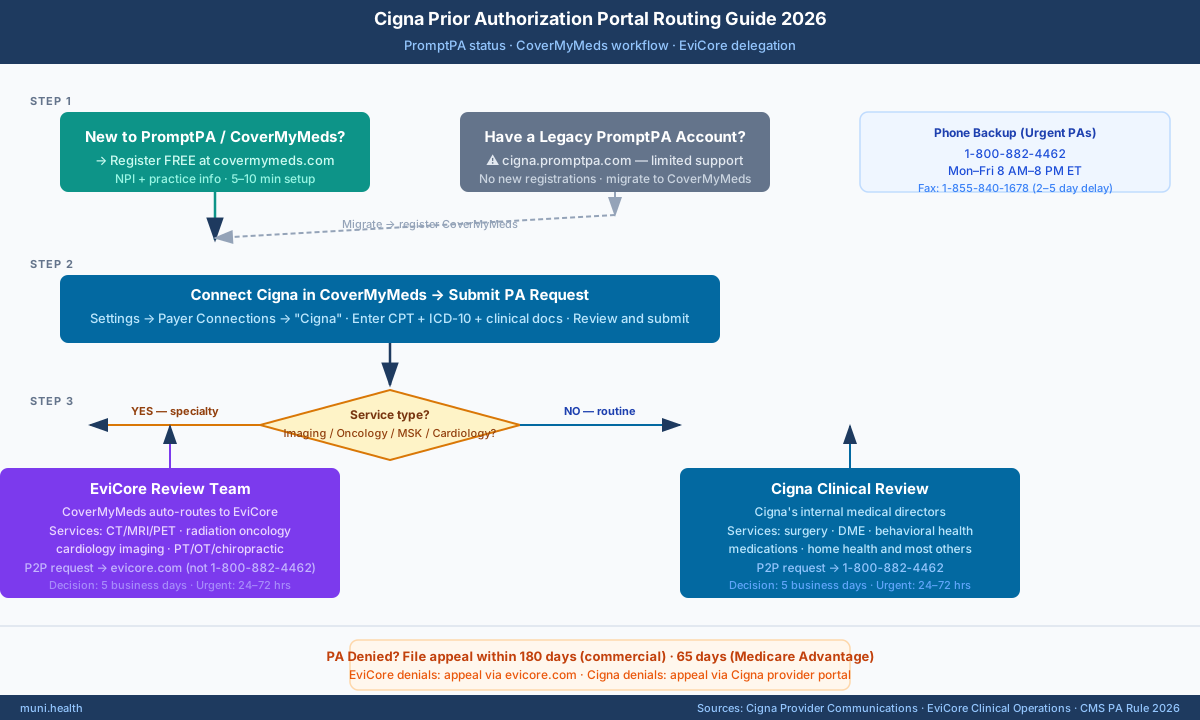
Submit all new Cigna prior authorizations through CoverMyMeds — then check whether your service type routes to EviCore (see section below) or stays with Cigna's internal review team. The four steps below apply to all CoverMyMeds submissions.
With the PromptPA transition, here's the current recommended process for Cigna prior authorizations:
Step 1: Register for CoverMyMeds (Free)
- Go to covermymeds.com
- Click "Create Account" or "Register"
- Select "Provider" as your account type
- Enter your NPI and practice information
- Verify your identity through the verification process
- Complete registration (typically takes 5-10 minutes)
No Cost to Providers
CoverMyMeds is completely free for healthcare providers. There are no subscription fees, per-transaction costs, or hidden charges. The platform is funded by the insurance companies and pharmaceutical manufacturers.
Step 2: Link Your Cigna Provider Account
After registering for CoverMyMeds:
- Log into your CoverMyMeds account
- Navigate to Settings → Payer Connections
- Search for "Cigna" in the payer list
- Follow the prompts to connect your Cigna provider credentials
- Verify the connection is active
Note: You'll need your Cigna Provider Web credentials or NPI to complete the connection.
Step 3: Submit Prior Authorization Request
Once connected, submitting a Cigna PA through CoverMyMeds:
- Start new request: Click "New Request" or "Start Prior Authorization"
- Enter patient info: Cigna member ID, DOB, patient name
- Select service: CPT/HCPCS codes, ICD-10 diagnosis codes
- Complete clinical questions: Answer Cigna-specific clinical questions (these are pulled from Cigna's medical policies)
- Attach documentation: Upload clinical notes, lab results, imaging reports
- Review and submit: Verify all information before submitting
Common Submission Errors
The most common errors that delay Cigna PA requests: (1) Incorrect or missing member ID, (2) ICD-10 code doesn't support medical necessity for the requested CPT, (3) Missing failed conservative treatment documentation. Double-check these before submitting.
Step 4: Track Status and Respond to Requests
After submission:
- Check status in real-time: CoverMyMeds shows current status (Pending, Approved, Denied, Need More Info)
- Respond to additional info requests: If Cigna needs more documentation, you'll receive a notification
- Download determination letters: Approval and denial letters available in the portal
- Track appeal deadlines: Note the appeal deadline on any denials (180 days for commercial, 65 days for Medicare)
When CoverMyMeds Routes to EviCore — Not Cigna
For imaging, cardiology, oncology, and musculoskeletal services, CoverMyMeds automatically routes your submission to EviCore — Cigna's third-party utilization management vendor — not to Cigna's own clinical review team. Most providers don't know this routing happens, and it changes who you call for peer-to-peer review and where you file an appeal.
EviCore (operated by Evernorth, Cigna's health services subsidiary) manages prior authorizations for these Cigna service categories. Specific delegated code lists are updated annually at cignaforhcp.cigna.com — the service categories below cover the most common delegated groups as of 2026:
| Service Category | Common CPT Ranges | Procedure Examples | PA Reviewer | P2P Contact |
|---|---|---|---|---|
| Radiology / Imaging | 70100–79999 | CT, MRI, PET, DEXA, Nuclear Medicine, diagnostic ultrasound | EviCore | evicore.com — NOT 1-800-882-4462 |
| Musculoskeletal / PT-OT | 27000–29999, 97010–97799 | PT, OT, chiropractic manipulation, spine surgery, joint replacement, arthroscopy | EviCore | evicore.com — NOT 1-800-882-4462 |
| Oncology | 96401–96549, 77000–77799 | Chemotherapy administration, radiation oncology, oncology infusion, IMRT | EviCore | evicore.com — NOT 1-800-882-4462 |
| Cardiac Imaging | 93303–93461, 78300–78999 | Stress echo, cardiac CT, nuclear cardiology, echocardiography | EviCore | evicore.com — NOT 1-800-882-4462 |
| Surgery, DME, Home Health, Medications | Varies by code | General surgery, DME, home health, non-oncology infusion | Cigna Internal | 1-800-882-4462 |
| Behavioral Health | 90000–90999 | Psychiatric evaluation, substance use treatment, IOP, ABA therapy | Evernorth Behavioral Health | Separate pathway — see below |
To confirm EviCore routing for a specific code: After submitting in CoverMyMeds, the confirmation screen identifies the reviewing entity. "Evernorth/EviCore" means your case is in the EviCore system; "Cigna" or "Cigna Health and Life" means Cigna internal review. You can also call 1-800-882-4462 with the authorization tracking number and ask which entity is handling the request.
Behavioral health note: Cigna behavioral health PA (CPT 90000–90999 range) routes to Evernorth Behavioral Health — not EviCore. The P2P and appeal path for BH denials goes through Evernorth Behavioral Health (accessible via the Cigna provider portal under the BH section), not through evicore.com. Calling EviCore for a behavioral health denial is the wrong path and does not preserve your P2P window.
Cigna Medicare Advantage Plans: EviCore Routing Differs
For Cigna Medicare Advantage members, the EviCore delegation pattern differs from commercial plans — most Cigna MA prior authorizations are handled by Cigna's internal MA UM team, not EviCore. Use the MA-specific provider line rather than the commercial PA line.
Key differences for Cigna Medicare Advantage PA submissions:
- MA provider line: 1-800-668-3813 (general Cigna MA) — always verify on the member's ID card, as the number can vary by MA plan region and year
- CoverMyMeds still accepts Cigna MA submissions, but the MA Payer ID is distinct from the commercial Cigna payer ID; confirm the correct payer selection before submitting
- EviCore delegation for MA: Cigna MA does delegate select imaging codes to EviCore in some states, but this is less comprehensive than commercial plan delegation. When in doubt, call the MA provider line to confirm which entity is reviewing a specific MA authorization
- CMS-0057-F timelines apply to Cigna MA: 7-day standard / 72-hour expedited PA decisions (effective January 1, 2026) — tighter than the 5-business-day standard that applies to commercial plans
Why This Matters Operationally
When CoverMyMeds routes your submission to EviCore, the PA confirmation email will show EviCore as the reviewing entity. If the PA is denied:
- Cigna's denial letter will reference EviCore's clinical criteria (not Cigna's standard MCG guidelines)
- Peer-to-peer review must be requested through evicore.com — calling Cigna's PA line (1-800-882-4462) for a P2P on an EviCore-managed denial is the wrong path and wastes the 7-day P2P window
- The appeal submission portal is also EviCore — not Cigna's provider portal or CoverMyMeds
Don't Miss the 7-Day P2P Window
For EviCore-managed Cigna PAs, you have 7 calendar days from the denial date to request a peer-to-peer review. Log into evicore.com with your NPI and request the P2P from the denial record. Calling Cigna's general PA number does not preserve this window.
| Service Type | PA Reviewer | P2P Request Path | P2P Phone | Deadline |
|---|---|---|---|---|
| Radiology / Imaging (CT, MRI, PET, Nuclear) | EviCore | evicore.com → My Account → Request P2P | 1-888-693-3211 | 7 calendar days from denial |
| Musculoskeletal (PT, OT, Chiropractic, Spine) | EviCore | evicore.com → My Account → Request P2P | 1-888-693-3211 | 7 calendar days from denial |
| Oncology / Infusion / Radiation | EviCore | evicore.com → My Account → Request P2P | 1-888-693-3211 | 7 calendar days from denial |
| Cardiac Imaging (Echo, Stress Test, Cardiac CT) | EviCore | evicore.com → My Account → Request P2P | 1-888-693-3211 | 7 calendar days from denial |
| Surgery / DME / Behavioral Health / Medications | Cigna Internal | Call 1-800-882-4462 → request P2P with auth number | 1-800-882-4462 | 7 calendar days from denial |
How to Confirm Whether Your PA Went to EviCore
- Check the CoverMyMeds confirmation: if the reviewer is listed as EviCore, your PA is in the EviCore system
- Check the denial letter: EviCore denials cite "EviCore clinical criteria" or "evicore.com" in the reconsideration instructions
- If uncertain, call Cigna's provider line (1-800-882-4462) and ask whether the authorization number is an EviCore-managed request
For a full breakdown of the EviCore appeal ladder — including the ClinicalLogic™ clinical criteria challenge process — see our guide to how to appeal a Cigna prior authorization denial.
Cigna Prior Authorization Submission Methods Compared
CoverMyMeds is the only electronic option that provides real-time status tracking and the fastest approval turnaround. Phone and fax remain available as fallbacks but add significant processing time.
While CoverMyMeds is preferred, Cigna still accepts prior authorizations through multiple channels:
| Method | Speed | Tracking | Approval Rate | Best For |
|---|---|---|---|---|
| CoverMyMeds (Portal) | 35% faster | Real-time | Highest (complete submissions) | All routine PA requests |
| Phone (1-800-882-4462) | Same-day possible | Manual follow-up required | Good (if peer-to-peer obtained) | Urgent authorizations, complex cases |
| Fax (1-855-840-1678) | 2-5 business days | Confirmation only | Lower (often missing info) | Backup when portal unavailable |
| Legacy PromptPA | Varies | If available | Standard | Legacy workflows (being phased out) |
Recommendation: Use CoverMyMeds for all standard PA requests. Reserve phone for urgent authorizations where you need immediate approval or want to request peer-to-peer review with a Cigna medical director.
Required Documentation for Cigna PA Requests
Every Cigna PA submission — whether through CoverMyMeds, phone, or fax — requires the same core documentation set. Incomplete submissions are the most common cause of delays and "Need More Information" holds, which pause the clock and can push decisions past the 5-business-day window.
Regardless of submission method, Cigna requires specific documentation to process prior authorizations efficiently:
Always Include:
- Patient name, DOB, and Cigna member ID
- Requesting provider name, NPI, and contact information
- Service requested with CPT/HCPCS codes
- ICD-10 diagnosis codes (primary and secondary)
- Clinical notes supporting medical necessity
For Medical Necessity:
- Detailed clinical history and current condition
- Failed conservative treatments (dates, duration, reason for failure)
- Objective clinical findings (exam, labs, imaging)
- Specialty society guidelines supporting the request
For Step Therapy or Prior Treatment Failures:
- Specific medication/treatment tried
- Dates of treatment
- Documented reason for discontinuation or inadequacy
- Adverse effects if applicable
For detailed templates and examples, see our Cigna Prior Authorization Complete Guide.
Common PromptPA and CoverMyMeds Errors (And How to Fix Them)
The five errors below account for the majority of Cigna PA submission failures. Each has a specific fix — most can be resolved and resubmitted the same day without losing your place in the review queue.
Prepare this appeal packet with your team.
Draft the appeal, coordinate missing documents, and approve the reviewed packet. Keep your clearinghouse; your practice checks deadlines and submits through the payer’s accepted channel.
First 3 appeals free, then $20 per appeal. Start with your denial letter or EOB and available records. No meeting or clearinghouse connection required.
Providers frequently encounter these issues when submitting Cigna prior authorizations electronically:
Error 1: "Member Not Found"
Cause: Incorrect member ID, typo in patient name, or patient not active on Cigna plan
Fix: Verify member ID from the patient's current insurance card. Check that the plan is active as of the service date. Try alternative ID formats (some cards show multiple IDs).
Error 2: "Service Does Not Require Prior Authorization"
Cause: CPT code may have been removed from Cigna's PA list (96 codes removed May 2025), or plan type doesn't require PA for this service
Fix: This is good news—you don't need PA! Verify by calling Cigna provider line if uncertain. Proceed with scheduling the service.
Error 3: "Incomplete Clinical Information"
Cause: Required clinical questions not fully answered or supporting documentation missing
Fix: Review all required fields. Common misses: failed treatments not documented, diagnosis doesn't match requested service, missing physician signature.
Error 4: "System Timeout"
Cause: CoverMyMeds or Cigna connection issues, large file uploads
Fix: Save your progress, try again during off-peak hours (early morning), reduce file sizes for uploads, use compressed PDFs.
Error 5: "Invalid CPT/ICD-10 Combination"
Cause: The diagnosis code doesn't support medical necessity for the requested procedure
Fix: Review the ICD-10 codes to ensure they accurately reflect the patient's condition and justify the procedure. Consult Cigna's clinical coverage policies for accepted diagnosis codes.
Cigna PA Decision Timelines and Deemed Denial Rights 2026
If Cigna fails to issue a PA decision within the federally mandated window, you can treat the non-response as a "deemed denial" and file an appeal immediately — without waiting for a written denial letter. This right applies across commercial and Medicare Advantage plans and is frequently overlooked by providers when Cigna's review queue backs up on high-volume specialty requests.
Federal standards that govern Cigna's PA decision timelines in 2026:
| Plan Type | Standard PA Window | Urgent PA Window | Authority | If Cigna Misses Deadline |
|---|---|---|---|---|
| Commercial — ERISA / ACA plans | 5 business days (Cigna contracted standard; federal minimum under 29 CFR §2560.503-1 is 15 calendar days) | 72 hours (3 calendar days) | 45 CFR §147.136; 29 CFR §2560.503-1 | Deemed exhaustion of internal process under 29 CFR §2560.503-1(l) — proceed to external independent review without further internal appeal |
| Medicare Advantage (HealthSpring, owned by HCSC — not Cigna) | 7 calendar days (tightened from 14 days under CMS-0057-F, effective January 1, 2026) | 72 hours | 42 CFR §422.568; CMS-0057-F (April 2024) | Automatically deemed denied under 42 CFR §422.568(c) — escalate to Level 1 MA appeal within 60 days of the deemed denial date |
| Medicare Advantage — Urgent (HealthSpring, owned by HCSC — not Cigna) | N/A | 72 hours | 42 CFR §422.570 | Deemed adverse coverage decision — request expedited IRE (Independent Review Entity) review; IRE must respond within 72 hours of receipt |
| Cigna Medicaid MCO (state-dependent) | 3–14 calendar days depending on state contract | 3 business days | 42 CFR §438.210 | File complaint with state Medicaid agency; federal floor for urgent requests is 3 business days |
How to invoke deemed denial rights in practice: If Cigna has not responded within the applicable window, call 1-800-882-4462, document the call date and reference number, and state that you are treating the non-response as a deemed denial under the applicable standard (cite 45 CFR §147.136 and 29 CFR §2560.503-1 for commercial plans; 42 CFR §422.568(c) for Medicare Advantage). Follow up in writing through the CoverMyMeds internal message feature — this creates the paper trail needed if the case proceeds to external review. For MA plans, Cigna must then treat the failure as an adverse determination and provide a written denial within the appeal window.
Automate Your Appeals Process
When your Cigna prior authorization is denied — through CoverMyMeds or EviCore — Muni Appeals generates a review-ready letter with payer-specific clinical citations and surfaces deadline risk. Staff verifies and files within the applicable window.
How to Check Cigna Prior Authorization Status in 2026
Check your Cigna PA status in CoverMyMeds under "My Requests" for electronic submissions — or call 1-800-882-4462 (Option 1) for phone-submitted requests. For EviCore-managed PAs (imaging, MSK, oncology), check evicore.com with your EviCore case number, not Cigna's provider portal — the Cigna portal will not show EviCore-managed case status.
Cigna is required to issue standard PA decisions within 5 business days for commercial plans (45 CFR §147.136) and within 7 calendar days for Medicare Advantage plans (42 CFR §422.568; tightened from 14 days under CMS-0057-F, effective January 1, 2026). Urgent/expedited requests must be resolved within 72 hours under both standards.
| How You Submitted | Where to Check Status | Phone Backup | Timeline |
|---|---|---|---|
| CoverMyMeds (commercial / MA) | covermymeds.com → My Requests → find case | 1-800-882-4462, Option 1 | 5 business days (commercial), 14 days (MA) |
| CoverMyMeds → EviCore routing (imaging/MSK/oncology) | evicore.com → My Account → Case Status | EviCore: 1-888-693-3211 | 3–5 business days standard |
| Phone submission (1-800-882-4462) | Call 1-800-882-4462, Option 1, have auth # ready | Same number | Same-day to 5 business days |
| Fax (1-855-840-1678) | Call 1-800-882-4462 with fax confirmation number | 1-800-882-4462, Option 1 | 2–5 business days after receipt |
| Urgent / Expedited (any channel) | Check CoverMyMeds hourly or call immediately | 1-800-882-4462 — state 'expedited review' | 72 hours from submission |
If your request shows "Need More Information": Cigna has paused the 5-business-day clock until you respond. Upload additional clinical documentation directly in CoverMyMeds — do not call to respond. Only uploaded documentation restarts the review clock.
Frequently Asked Questions About Cigna PromptPA
Is Cigna PromptPA still available in 2026?
PromptPA is no longer Cigna's active PA platform. Cigna has fully transitioned to CoverMyMeds as the preferred electronic prior authorization system. If your existing PromptPA login still works, it may continue functioning for certain legacy workflows, but Cigna is not issuing new PromptPA accounts and support is limited. All new PA submissions should go through CoverMyMeds.
Where is the Cigna PromptPA login URL (cigna.promptpa.com)?
cigna.promptpa.com is a legacy URL for a platform Cigna no longer actively supports. If you're looking for Cigna's current PA portal, go to covermymeds.com — that is Cigna's replacement for PromptPA. If you have an existing PromptPA account, it may still be accessible through your original registration materials, but new users should register for CoverMyMeds instead.
How do I log into Cigna PromptPA?
If you have an existing PromptPA account, access it through the Cigna provider portal or the direct PromptPA URL provided in your original registration materials. However, new users should register for CoverMyMeds instead, as Cigna is no longer actively supporting new PromptPA registrations.
What is the difference between PromptPA and CoverMyMeds?
PromptPA was Cigna's proprietary prior authorization portal. CoverMyMeds is a third-party platform used by multiple insurers. CoverMyMeds offers faster processing (35% faster than fax), better EHR integration, and allows you to submit PAs to multiple insurance companies from one platform.
Do I need to register again for CoverMyMeds if I had PromptPA?
Yes. CoverMyMeds is a separate platform with separate registration. Your PromptPA credentials do not transfer. Registration is free and takes about 5-10 minutes.
What is the phone number for Cigna prior authorization?
Cigna prior authorization phone: 1-800-882-4462. Hours: Monday-Friday, 8 AM - 8 PM ET. Have patient information, CPT codes, and clinical justification ready before calling.
How long does Cigna prior authorization take?
Standard Cigna prior authorizations take 5 business days for a decision. Urgent/expedited requests can receive same-day or next-day decisions if medical urgency is documented. CoverMyMeds submissions are processed 35% faster than fax.
What if my CoverMyMeds submission fails?
If your electronic submission fails: (1) Save any entered data, (2) Check for error messages and resolve issues, (3) Try again during off-peak hours, (4) If persistent issues, call Cigna at 1-800-882-4462 or fax to 1-855-840-1678 as backup.
Can I still fax Cigna prior authorization requests?
Yes. Cigna fax for prior authorization: 1-855-840-1678. However, fax submissions take 2-5 business days longer than CoverMyMeds and don't offer real-time status tracking.
Does CoverMyMeds work with my EHR?
CoverMyMeds integrates with most major EHR systems including Epic, Cerner, athenahealth, eClinicalWorks, and others via SureScripts. Check with CoverMyMeds support or your EHR vendor for specific integration availability.
What codes were removed from Cigna PA requirements?
Effective May 31, 2025, Cigna removed 96 procedure codes from prior authorization requirements, primarily routine and low-complexity services. This means these services no longer require PA before scheduling. Contact Cigna or check their provider portal for the specific code list.
How do I check status of my Cigna PA request?
In CoverMyMeds, log in and navigate to "My Requests" to see real-time status of all pending and completed PAs. Statuses include: Pending, Approved, Denied, Need More Information. You'll also receive email notifications for status changes.
What happens if Cigna denies my prior authorization?
If denied, you have 180 days (commercial plans) or 65 days (Medicare Advantage) to file an appeal. See our Cigna Appeal Letter Template for step-by-step appeal guidance with templates.
Next Steps
If you're transitioning from PromptPA:
- Register for CoverMyMeds at covermymeds.com (free)
- Connect your Cigna provider credentials
- Start submitting new PA requests through CoverMyMeds
- Keep PromptPA credentials for any legacy workflows that require it
If a Cigna PA is denied:
- Check whether the denial came from Cigna or EviCore (see the EviCore section above — they require different appeal paths)
- Review the denial reason and the clinical criteria cited (Cigna MCG vs. EviCore clinical criteria)
- Request peer-to-peer review within 7 days: evicore.com (EviCore denials) or 1-800-882-4462 (Cigna denials)
- File formal appeal within deadline (180 days commercial, 65 days Medicare Advantage)
- See our step-by-step guide to appealing a Cigna prior authorization denial
- Use our Cigna Appeal Letter Template for the written submission
For more Cigna resources: