

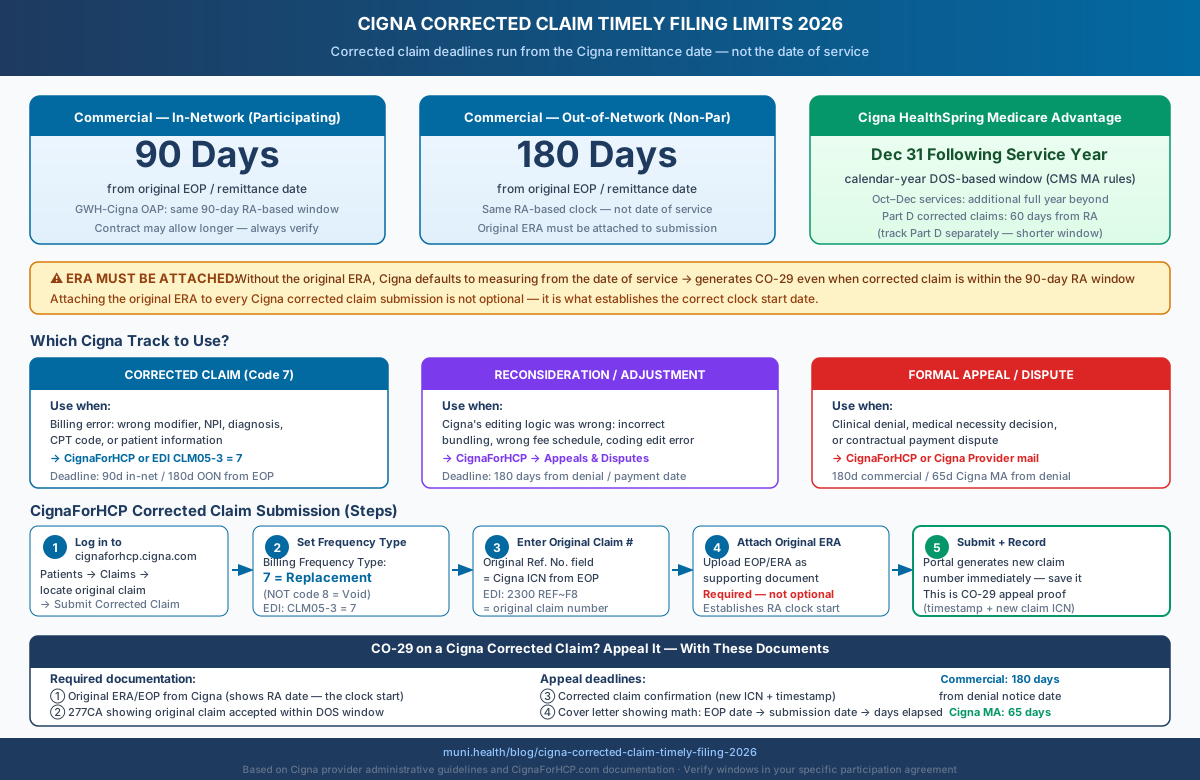
Cigna's corrected claim TFL is 90 days from the original EOP/remittance date for in-network commercial providers and 180 days for out-of-network. HealthSpring (formerly Cigna Medicare Advantage, now owned by HCSC): through December 31 of the calendar year following the service year. The clock starts at the Cigna remittance date — not the date of service. Submitting without the original ERA attached causes Cigna to default to the DOS clock, generating a CO-29 that should not have been issued.
What Counts as a Cigna Corrected Claim — and What Doesn't
A corrected claim fixes a billing error on an already-adjudicated Cigna claim and runs on its own deadline — separate from both the original claim TFL and the appeal window. Getting this wrong routes the submission to the wrong Cigna processing unit, delays resolution, and can permanently close the recovery window.
Cigna distinguishes between three administrative tracks for post-adjudication claims work:
| Track | Use Case | Submission Path | Deadline |
|---|---|---|---|
| Corrected claim (frequency code 7) | Fix a billing error on an already-adjudicated claim: wrong modifier, NPI, diagnosis code, or rendering provider | CignaforHCP.com → Claims, or EDI 837 CLM05-3 = 7 | 90 days in-network / 180 days OON from original RA date |
| Claim reconsideration / adjustment | Challenge a processing error or coding edit — claim was coded correctly but Cigna applied wrong editing logic or bundled it incorrectly | CignaforHCP.com → Appeals & Disputes → Reconsideration | 180 calendar days from initial payment or denial date |
| Formal appeal / dispute | Contest a clinical denial, medical necessity determination, or contractual payment dispute after informal resolution fails | CignaforHCP.com → Appeals & Disputes for Cigna commercial; HealthSpring's current channel for its MA plans | 180 days Cigna commercial; 65 days HealthSpring participating-provider appeal unless the agreement says otherwise |
The most costly routing error is filing a formal appeal when a corrected claim is the right path. An appeal routes to Cigna's clinical or contract team, which evaluates the adjudication decision — not the billing data. If the underlying error is a wrong modifier or missing NPI, the appeal fails on the merits because the billing problem was never corrected. The corrected claim window may still be open while the appeal is pending, but it is running.
Cigna Corrected Claim Timely Filing Limits by Plan Type
All Cigna corrected claim deadlines run from the remittance date, not the date of service — which gives practices a meaningful window after initial adjudication even when the original DOS window has closed.
Prepare this appeal packet with your team.
Draft the appeal, coordinate missing documents, and approve the reviewed packet. Keep your clearinghouse; your practice checks deadlines and submits through the payer’s accepted channel.
First 3 appeals free, then $20 per appeal. Start with your denial letter or EOB and available records. No meeting or clearinghouse connection required.
| Plan Type | Corrected Claim Window | Clock Starts From | Key Condition |
|---|---|---|---|
| Commercial — In-Network (Participating) | 90 days | Original EOP/remittance date | Your participation agreement may specify a longer window; Cigna's published default is the floor |
| Commercial — Out-of-Network (Non-Par) | 180 days | Original EOP/remittance date | Same RA-based clock; longer window reflects non-par administrative variability |
| GWH-Cigna (Open Access Plus / OAP) | 90 days | Original EOP/remittance date | OAP plans follow in-network commercial corrected claim rules |
| HealthSpring / Medicare Advantage (formerly Cigna MA, now HCSC) | Through December 31 of the year following the service year | Date of service (MA calendar-year window) | Original MA claim must have been submitted within the MA TFL; Part D corrections shorter |
| Part D corrected claims | 60 days from original RA or denial | Original remittance or denial date | Separate from MA medical corrected claim window; shorter deadline — track separately |
| Coordination of Benefits (COB) / MSP | 90 days | Date of primary carrier's EOB | Clock starts from primary payer's remittance, not the original DOS |
The operationally critical distinction across this table: Cigna MA corrected claims follow the CMS-mandated calendar-year window (through December 31 of the following year), while commercial corrected claims run 90 days from the Cigna remittance date. A practice with both commercial and MA Cigna patients must track these on completely separate deadline calendars — applying the MA window to commercial or the commercial window to MA is a reliable way to miss a corrected claim deadline.
Commercial In-Network: 90 Days from the Remittance Date, Not the Date of Service
For Cigna commercial in-network providers, the corrected claim TFL is 90 days from the date Cigna issued the original EOP or ERA — not from the date of service. This RA-based clock is the most commonly misapplied rule in Cigna corrected claim billing.
The practical implication: a service rendered in January with a Cigna remittance issued in March gives the billing team until late June (90 days from the March EOP) to file the corrected claim. A team measuring from the January date of service would assume the window closed in April and write off the account. The ERA-based clock is the operative rule, and it gives substantially more recovery time.
Your Contract May Allow More Time
Cigna's published corrected claim policy is 90 days from the EOP for in-network commercial providers. Individual participation agreements sometimes specify a longer window. Always verify your specific contract language before assuming the published default is your limit. Cigna enforces contract terms, not just published administrative guidelines.
For out-of-network (non-participating) commercial corrected claims, Cigna allows 180 days from the original EOP date. The same RA-based clock applies, not the date of service. Non-par corrected claim submissions require all the same elements: original claim number, frequency code 7, and the original ERA attached.
GWH-Cigna Open Access Plus plans follow the standard commercial in-network rules: 90 days from the original EOP date, same submission path through CignaForHCP or clearinghouse EDI.
CignaForHCP Reconsideration vs. Formal Appeal: Which Track to Use
Use a claim reconsideration through CignaForHCP when Cigna made a processing or coding edit error; use a formal appeal when contesting a clinical denial or payment decision. These two tracks have the same 180-day window from the denial date, but they route to different Cigna teams and succeed or fail on different criteria.
The reconsideration channel — available through CignaforHCP.com to any portal user with claims/reconsideration access — is designed for situations where a claim was coded correctly but Cigna's editing logic applied an incorrect bundle, downcoded a modifier, or applied an incorrect fee schedule. Per Cigna's documentation, a reconsideration request can be submitted on any claim that "was denied or not processed as expected due to claim coding edits." Billing staff can initiate this without clinical documentation.
When a claim was denied because of a billing error you made — wrong modifier, incorrect NPI, mismatched date of birth — a corrected claim (frequency code 7) is the right path, not a reconsideration. Reconsideration challenges Cigna's decision; a corrected claim corrects your submission. Sending a billing error through the reconsideration track routes it to Cigna's payment dispute team, which will evaluate the adjudication logic — and find it correct — because the underlying billing data was wrong. The corrected claim window continues to run during this failed reconsideration process.
The Practical Decision Rule
Ask: did Cigna process the claim incorrectly, or did we bill it incorrectly? If Cigna applied wrong editing logic to a correct claim → reconsideration. If the billing data itself was wrong (modifier, NPI, code, date) → corrected claim. If Cigna denied coverage entirely → formal appeal.
How to Submit a Cigna Corrected Claim
The fastest, most audit-proof method is electronic submission through CignaforHCP.com or via EDI — both generate an immediate claim number and submission timestamp that serve as the primary documentation for any CO-29 appeal.
CignaforHCP.com Portal
- Log in at cignaforhcp.cigna.com → Patients → Claims
- Locate the original claim in the claims history and open its detail record
- Select Submit Corrected Claim (available on any previously adjudicated claim)
- In the claim form, confirm the Billing Frequency Type is set to 7 — Replacement of Prior Claim
- Confirm the Original Claim Number (the Cigna-assigned ICN or claim reference number from the original EOP) is populated in the reference field — do not leave this blank
- Correct the specific fields containing the billing error; do not alter any clinical content unless it was documented in error
- Attach the original ERA or EOP as a supporting document before submitting — this is the document that establishes the remittance date from which the 90-day corrected claim clock runs
- Submit — the portal generates a new claim reference number immediately; record it
EDI 837P / 837I
For clearinghouse submissions (Change Healthcare, Availity, Trizetto, or any certified Cigna EDI clearinghouse):
- CLM05-3 = 7 (Replacement of Prior Claim) on the 837P or 837I
- 2300 REF~F8 = [original Cigna claim number] — the F8 qualifier carries the original claim ICN
- Attach the original ERA where your clearinghouse supports file-level attachments; if not, mail or fax the ERA with a cover sheet referencing the corrected claim submission date and new claim number
Paper CMS-1500
For paper submissions (strongly discouraged — no immediate confirmation):
- Box 22, Resubmission Code: enter
7 - Box 22, Original Ref. No.: enter the original Cigna claim number from the original EOB
- Submit via certified mail; retain the postal receipt as your proof of submission date
Code 8 Is Not Code 7 — Know the Difference
Frequency code 8 (Void/Cancel Prior Claim) deletes the original claim entirely. Using code 8 when you meant code 7 cancels the original payment and requires a new original claim submission, restarting the timely filing clock from the date of service. If the DOS window has closed, code 8 creates an uncollectable account. Always use code 7 for corrections. Code 8 is only appropriate when the original claim needs to be fully withdrawn with no replacement.
Why Cigna Issues CO-29 on Corrected Claims — and When to Appeal
The most preventable corrected claim denial at Cigna is a CO-29 caused by a missing original ERA. Without the ERA attached, Cigna's adjudication system cannot determine the remittance date from which the 90-day corrected claim window runs and defaults to measuring from the date of service instead.
When Cigna measures from the DOS rather than the RA date, a corrected claim submitted within the 90-day RA window but outside the original 90-day DOS window triggers an automatic CO-29. The billing error is never corrected. The corrected claim deadline is not credited.
When to appeal a CO-29 on a Cigna corrected claim:
- The original claim was submitted within the applicable Cigna DOS-based TFL
- The corrected claim was submitted within Cigna's actual corrected claim window (90 days in-network, 180 days OON) measured from the original EOP date
- Cigna issued CO-29 because the ERA was missing and the system measured from the DOS
Documentation for the appeal:
- Original ERA or EOP from Cigna showing the date Cigna issued the original remittance — this establishes when the 90-day corrected claim clock started
- 277CA clearinghouse acceptance report showing the original claim was accepted within the Cigna DOS-based TFL
- CignaForHCP submission confirmation (new claim number + timestamp) or EDI 997/999 acceptance for the corrected claim, showing it was submitted within the 90-day RA window
- Copies of both original and corrected CMS-1500 claim forms
- A cover letter showing the math: original EOP date, corrected claim submission date, days elapsed (must be ≤90 in-network or ≤180 OON)
Appeal deadlines:
- Commercial CO-29 appeal: 180 days from the denial notice date
- HealthSpring participating-provider CO-29/timely-filing dispute: use the claim dispute or reconsideration process; the July 2026 HealthSpring participating-provider manual permits filing up to 180 days from the claim payment date, unless the provider agreement states otherwise
- HealthSpring participating-provider clinical appeal (medical necessity, clinical guidelines, prior authorization, or referral decision): 65 days from the original decision, unless the provider agreement states otherwise
Submit the appeal through CignaforHCP.com (Appeals & Disputes) or mail to the address on the denial EOB. For the full Cigna appeal submission workflow including fax numbers, mailing addresses, and portal steps, see the Cigna appeal submission guide 2026.
HealthSpring Medicare Advantage (Formerly Cigna MA): The Year-End Window
Cigna no longer operates Medicare Advantage — HCSC acquired that business in a deal that closed March 19, 2025 and rebranded it HealthSpring. HealthSpring corrected claims must be submitted by December 31 of the calendar year following the service year — a window governed by CMS MA guidance and materially longer than the commercial 90-day RA-based limit that still applies to Cigna's own plans.
Prepare this appeal packet with your team.
Draft the appeal, coordinate missing documents, and approve the reviewed packet. Keep your clearinghouse; your practice checks deadlines and submits through the payer’s accepted channel.
First 3 appeals free, then $20 per appeal. Start with your denial letter or EOB and available records. No meeting or clearinghouse connection required.
This calendar-year window means a HealthSpring MA service performed in January 2026 can be corrected through December 31, 2027. A commercial Cigna service from the same date must be corrected within 90 days of the remittance — potentially closing by June 2026 if Cigna's EOP issued in March.
The HealthSpring MA corrected claim window operates on a DOS-based calendar-year logic (matching the original MA TFL), not the RA-based logic that governs commercial Cigna corrected claims. Practices with mixed Cigna commercial and HealthSpring MA panels must apply completely separate deadline rules — and separate submission channels, since HealthSpring is a different company — to each product line.
For HealthSpring MA services rendered October through December of a given year, CMS guidance provides an additional full calendar year beyond the standard following-year deadline — the same extension that applies to original MA claim TFLs. A November 2026 HealthSpring MA service can therefore be corrected through December 31, 2028.
Part D Corrected Claims: Shorter Window
Part D (prescription drug) corrected claims for the former Cigna MA book follow a shorter timeline than HealthSpring MA medical corrected claims: 60 days from the original remittance or denial date. Track Part D and MA medical corrected claim deadlines separately — applying the year-end MA medical window to Part D submissions creates an exposure to late-correction denials. For HealthSpring prior authorization routing and PAC service changes effective January 2026, see the Cigna HealthSpring prior authorization 2026 guide.
For the full HealthSpring MA timely filing breakdown including original claim DOS windows and state-specific exceptions, see the Cigna timely filing limits guide.
How Muni Appeals Handles Cigna Corrected Claim Workflows
Cigna corrected claim management requires tracking two separate deadline types per claim — the RA-based commercial corrected claim window and the calendar-year MA window — while also routing billing errors to the corrected claim track rather than the reconsideration or appeal track, which most billing teams conflate.
Muni Appeals organizes the Cigna corrected-claim response for staff review:
- Surfaces corrected-claim deadline risk from the uploaded remittance; staff verifies the commercial or Medicare Advantage window
- Suggests a likely Cigna response path for staff to verify: corrected claim, reconsideration, or formal appeal
- Uses an uploaded 277CA to surface possible timely-original-submission evidence for staff review
- Generates Cigna-specific corrected-claim reconsideration drafts that reference an uploaded original ERA
- Organizes uploaded ERAs with the draft so staff can include the right evidence in a CO-29 response
Frequently Asked Questions
What is Cigna's corrected claim timely filing limit for commercial plans?
For in-network participating commercial providers, Cigna's corrected claim timely filing limit is 90 days from the date of the original EOP or ERA. The clock starts when Cigna issues the remittance on the original claim — not from the date of service. Out-of-network providers get 180 days from the same EOP date. Your specific participation agreement may specify a longer window; always verify your contract before assuming the published default applies.
What is the corrected claim deadline for HealthSpring (formerly Cigna Medicare Advantage)?
HealthSpring MA corrected claims must be submitted by December 31 of the calendar year following the service year, consistent with CMS Medicare Advantage guidance. This is materially longer than the commercial 90-day RA-based window that still applies to Cigna's own plans — HealthSpring is a separate company, owned by HCSC since a deal closed March 19, 2025, not a Cigna line. Services rendered October–December get an additional full year beyond the standard following-year deadline. Part D corrected claims follow a shorter 60-day window from the original remittance and must be tracked separately.
What frequency code do I use for a Cigna corrected claim?
Use frequency code 7 (Replacement of Prior Claim) on CMS-1500 Box 22 Resubmission Code, and enter the original Cigna claim number in the Original Ref. No. field. On the EDI 837P or 837I, use CLM05-3 = 7 with the original claim number in the 2300 REF~F8 segment. On a UB-04, change the third digit of the Type of Bill to 7 (for example, 137 for outpatient). Code 8 voids the original claim entirely — do not use it when you intend to correct.
Should I submit a corrected claim or a reconsideration to Cigna?
Submit a corrected claim (frequency code 7) when the billing data was wrong — modifier, NPI, diagnosis code, procedure code, or patient information. Submit a reconsideration through CignaForHCP when Cigna made a processing or editing error on a correctly submitted claim. Submit a formal appeal when contesting a clinical denial or coverage decision. Using the wrong track routes the submission to the wrong Cigna team and delays resolution without stopping the corrected claim deadline.
What happens if I submit a Cigna corrected claim without the original ERA attached?
Cigna cannot determine the EOP/remittance date without the original ERA and defaults to measuring timely filing from the date of service. If the DOS-based window has closed but the RA-based corrected claim window is still open, this default generates an incorrect CO-29. Attach the original ERA to every Cigna corrected claim submission — it is the document that establishes when the 90-day corrected claim clock started. The ERA is not optional.
Can I appeal a CO-29 on a Cigna corrected claim?
Yes — if the corrected claim was submitted within Cigna's actual corrected claim window (90 days in-network, 180 days OON from the EOP date), a CO-29 is incorrect and should be disputed. Attach the original ERA establishing the EOP date, the 277CA acceptance report for the original claim, and the corrected claim submission confirmation. Show the math: EOP date, corrected claim date, days elapsed. Cigna commercial CO-29 appeals use the applicable commercial window. For HealthSpring participating providers, the July 2026 manual routes timely-filing denials through claim dispute or reconsideration and permits filing up to 180 days from the claim payment date, unless the provider agreement says otherwise. Its separate 65-day limit applies to clinical appeals, not CO-29 disputes.
Does submitting a corrected claim extend or reset Cigna's original timely filing clock?
No. A corrected claim runs on its own RA-based deadline and does not extend, reset, or interact with the original DOS-based timely filing clock. The original DOS window continues to run independently. If the DOS window closes before the corrected claim is submitted, the correct track is a CO-29 appeal based on the RA-based window, not a new original submission. For the full Cigna original claim TFL rules and state-specific exceptions, see the Cigna timely filing limits 2026 guide.
Ready to Stop Losing Cigna Corrected Claims to CO-29 Denials?
Cigna CO-29 denials on corrected claims are recoverable — but only within the RA-based window and only with the original ERA as documentation. The most common failure is measuring the corrected claim deadline against the date of service rather than the Cigna remittance date, and routing billing errors through the reconsideration track instead of the corrected claim track.
Get Started:
- RA-based corrected-claim deadline guidance, separate from original DOS TFLs, for staff verification
- Likely post-adjudication track guidance for staff to verify: corrected claim, reconsideration, or appeal
- ERA storage at the claim level for CO-29 appeal documentation
- Cigna-specific corrected claim appeal letters with ERA documentation attached
- CO-29 detection and appeal generation across commercial, HealthSpring MA, and OAP plans
This guide reflects 2026 Cigna corrected claim timely filing procedures based on Cigna's published provider administrative guidelines, CignaForHCP.com documentation, and CMS Medicare Advantage program guidance. Commercial corrected claim windows are controlled by your individual Cigna participation agreement — always verify the specific window in your contract before relying on published defaults. HealthSpring Medicare Advantage corrected claim windows are governed by CMS MA program requirements and your HealthSpring participation agreement — HealthSpring is Health Care Service Corporation's Medicare Advantage business, built on the book HCSC acquired from Cigna in a deal that closed March 19, 2025, not a Cigna-operated line. For related Cigna billing guidance, see our Cigna Timely Filing Limits 2026, Cigna Appeal Submission Guide 2026, and Corrected Claim Timely Filing Limits 2026.