

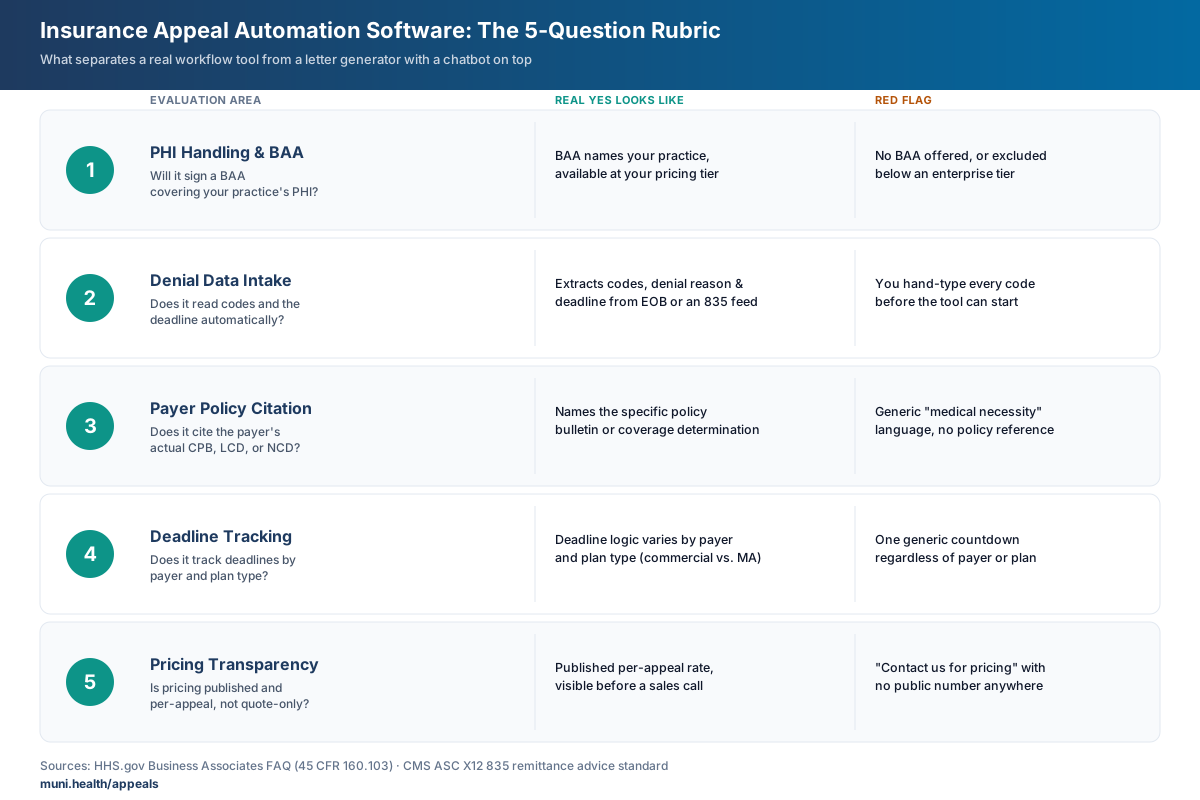
Insurance appeal automation software spans free patient letter generators to enterprise RCM suites, and most of that range doesn't fit an independent practice. Before buying, check five things: automatic denial-data intake, payer-specific policy citation, deadline tracking by payer and plan, a signed BAA covering your PHI, and transparent per-appeal pricing instead of a sales-call-only quote.
What Insurance Appeal Automation Software Actually Covers
The category spans a much wider range than the marketing copy suggests. On one end are free, patient-facing letter generators built for individuals fighting a single denial. On the other are enterprise revenue cycle management (RCM) suites built for hospital systems with dedicated denials departments and six-figure contracts.
Independent practices sit in the middle, and most tools in the category weren't built for that middle. A KFF analysis of 2024 ACA marketplace data found insurers denied roughly 85 million in-network claims that year, and consumers appealed fewer than 1% of them (KFF, "Claims Denials and Appeals in ACA Marketplace Plans in 2024"). That gap exists on the provider side too — not because appeals aren't winnable, but because the staff time to research, draft, and track each one rarely gets prioritized against everything else on a billing team's plate.
Appeal automation software is supposed to close that gap by compressing the research-and-drafting work. Whether a given tool actually does that — versus just producing a nicely formatted letter — is what the rest of this guide is about.
For a ranked comparison of specific named tools in this category, see Best AI Appeal Generator for Medical Practices in 2026. This guide covers how to evaluate any tool you're considering, named or not.
The Five Questions That Actually Separate Tools in This Category
Every vendor in this space will tell you their product is "AI-powered" and "saves time." That's not a useful filter. These five questions are.
1. Does it read your denial data, or do you have to spell out every code yourself?
A denial letter or EOB contains the payer, the procedure and diagnosis codes, the denial reason code, and (usually) the appeal deadline. A tool that requires your staff to manually type all of that in before it can help isn't automating the research step — it's automating the typing step, which was never the bottleneck.
Ask specifically whether the tool can take an uploaded denial letter or EOB and extract the denial reason, codes, and deadline on its own, or whether it needs a structured data feed like an ASC X12 835 electronic remittance advice — the HIPAA-adopted standard format payers use to transmit claim payment and denial data electronically (CMS, Health Care Payment and Remittance Advice standard). Either path is legitimate — direct 835 ingestion is faster at volume, upload-based extraction is simpler to set up — but a sales demo that skips this question is worth pushing on.
2. Does it cite the payer's actual policy, or generate generic medical-necessity language?
A denial for lack of medical necessity almost always traces back to a specific clinical policy bulletin (CPB), local coverage determination (LCD), or national coverage determination (NCD). An appeal that argues medical necessity in the abstract, without naming and addressing the specific policy criteria the payer applied, reads as generic to the reviewer on the other end — and generic appeals are the easiest ones to deny again.
What to watch for in a demo
If a vendor's sample appeal letter doesn't name a specific policy number, bulletin, or coverage determination anywhere in the text, ask to see one that does. A tool built around denial-reason-specific policy citation should be able to produce that on request.
3. Does it track deadlines by payer and plan type?
Timely filing and appeal windows vary by payer, by plan type (commercial vs. Medicare Advantage vs. Medicaid managed care), and sometimes by claim type (corrected claim vs. initial appeal). A tool that treats every appeal as a generic "you have some number of days" doesn't reflect how differently these deadlines actually work. Deadline logic that's specific to payer and plan type is a meaningfully different feature than a generic countdown.
4. Will it sign a BAA that covers your practice's PHI — and what does that BAA actually cover?
Any vendor that creates, receives, maintains, or transmits protected health information on your practice's behalf is a HIPAA business associate and is required to operate under a signed Business Associate Agreement — not just a general privacy policy (HHS.gov, Business Associates FAQ). This is not optional or a "nice to have" — using a tool that processes real patient data without a signed BAA in place is a compliance gap your practice owns, not the vendor's.
Getting a "yes" on the BAA question isn't the end of the diligence. Ask what the agreement actually covers: whether patient data is ever used to train underlying AI models, what encryption applies in transit and at rest, and whether the BAA is available at every pricing tier or only on enterprise plans.
5. Is pricing per-appeal and transparent, or a seat-based contract built for a bigger buyer?
Enterprise RCM platforms are frequently quote-only, with pricing gated behind a sales conversation and, often, a multi-year contract. That model makes sense for a hospital system running thousands of claims a month. It's a poor fit for a practice trying to decide whether a single $400 denial is worth appealing — you need to know the cost per appeal before you commit, not after a demo call.
Look for published, per-unit pricing (per appeal, per document) you can evaluate against your own denial volume without talking to sales first.
Evaluation Checklist
Use this as a scorecard while you're comparing tools. A vendor that can't give you a straight answer on any row is worth a follow-up question before a purchase decision.
| Category | What a real 'yes' looks like | Red flag |
|---|---|---|
| PHI handling | Signs a BAA naming your practice specifically, available at your pricing tier | No BAA offered, or it's excluded below an enterprise tier |
| Denial data intake | Reads codes, denial reason, and deadline from an uploaded EOB/denial letter or an 835 feed | You have to hand-type every code before the tool can start |
| Payer policy citation | Names the specific CPB, LCD, or NCD behind the denial in the draft | Generic 'medical necessity' language with no policy reference |
| Deadline tracking | Deadline logic varies by payer and plan type | One generic countdown regardless of payer or plan |
| Pricing | Published per-appeal or per-document rate, visible before a sales call | 'Contact us for pricing' with no public number anywhere |
| Commitment | Pay-as-you-go credits or month-to-month, no multi-year lock-in | Long-term contract required just to see the product |
Where Muni Appeals Fits
To be specific about our own product rather than describing the category in the abstract: Muni Appeals is built for the middle of this market — independent practices and small billing teams, not hospital RCM departments.
Here's what that means against the checklist above, pulled directly from the live product page and pricing page:
- Denial data intake: You upload the denial letter or EOB; Muni extracts the payer, codes, deadline, and denial category from the document rather than requiring you to enter that data by hand.
- Payer policy citation: The draft is built around the payer's own policy language and the specific denial reason, not a generic medical-necessity template.
- Deadline guidance: Muni surfaces a coarse deadline-risk bucket from the uploaded notice. Staff verifies the exact payer and plan deadline, calendars it, and monitors follow-up.
- PHI handling: Muni signs a BAA with every customer, and patient data is encrypted in transit and at rest.
- Pricing: $20 per appeal, with the first 3 free and no credit card required. No subscription — credits don't expire, and there's no multi-year contract.
- Staff role: Your team reviews and approves the draft before it's submitted. Automation compresses the research-and-drafting work; it doesn't replace the judgment call on whether and how to appeal.
One honest limit worth naming: Muni works from an uploaded denial document today, not a live 835/ERA data feed — for most independent practices that's a faster setup path than an EDI integration project, but if your billing system already streams remittance data and you specifically want direct-feed ingestion, ask about that fit before assuming it's covered.
For the full cost math against manual appeal handling, see Muni Appeals Pricing Explained: $20 Per Appeal vs. the Real Cost of Manual Appeals.
Try it on a real denial before deciding
Three free appeal credits, no credit card. See the actual draft Muni produces from one of your own denials.
First 3 appeals free, then $20 per appeal. Start with your denial letter or EOB and available records. No meeting or clearinghouse connection required.
What to Ask a Vendor Before You Sign
Bring these into a demo or sales call instead of letting the vendor set the agenda:
- "Can you show me an appeal letter your tool generated that cites a specific CPB, LCD, or NCD number — not a demo script, an actual output?"
- "Walk me through what happens if I upload a Medicare Advantage denial versus a commercial denial. Does the deadline logic change?"
- "Where is your BAA in writing, and does it apply at the pricing tier I'd actually be on?"
- "What's the cost for one appeal, today, without a contract?"
- "If I stop using this next month, is there a cancellation fee or minimum term?"
A vendor that answers all five directly, without redirecting to "let's get you on a call with our team," has probably built the workflow depth this category needs. One that can only answer in generalities is likely closer to a letter template with a chatbot interface.
Before deciding whether a given denial is even worth the appeal effort — automated or manual — see When to Appeal an Insurance Denial: Decision Framework for the triage filter most practices skip.
Frequently Asked Questions
What is insurance appeal automation software?
It's software that compresses the research-and-drafting work of an insurance appeal — reading the denial, identifying the applicable payer policy, drafting a structured letter, and often tracking the filing deadline — so staff review and submit rather than starting from a blank page.
Is appeal automation software HIPAA compliant?
Compliance depends on the vendor, not the category. Any tool processing real patient data must operate under a signed Business Associate Agreement with your practice, per HHS guidance on business associates. A privacy policy alone does not satisfy this requirement — ask specifically for the BAA before sending real PHI through any tool.
Does appeal automation software integrate with my EHR or billing system?
It depends on the tool and the integration model. Some products require an EDI feed connection to your billing system; others work from an uploaded denial letter or EOB with no system integration required. Muni Appeals uses the upload model and does not require an EHR migration to start.
How much does insurance appeal automation software cost?
Pricing models vary widely across the category — per-document, per-appeal, per-seat, and enterprise-quote-only are all common. Muni Appeals is $20 per appeal with the first 3 free and no subscription, based on current published pricing.
Can appeal automation software replace my billing staff?
No legitimate tool in this category claims to replace the decision-making and final review a billing team provides. What it replaces is the manual research and drafting labor — pulling the policy, writing the letter, tracking the date — that eats staff time without requiring clinical or billing judgment. It also isn't a substitute for a full outsourced billing service, which typically covers claim submission and payment posting too — see Outsourced Billing Service vs. Appeal Automation for how the two compare.
What's the difference between an AI appeal generator and full appeal automation software?
An AI appeal generator typically produces a letter and stops there. Fuller appeal automation software adds payer-specific policy citation, deadline tracking by payer and plan type, and a defined submission workflow — the difference between a document and a complete workflow.
Do I need a contract to try appeal automation software?
Not with every vendor. Look specifically for tools that let you test on a real denial before any commitment — Muni Appeals offers 3 free appeal credits with no credit card required, which is worth using before evaluating any paid tier.
What size practice is this category actually built for?
It varies by vendor. Enterprise RCM suites are built for hospital systems with dedicated denials staff and high monthly claim volume; they're generally not worth the sales and implementation overhead for a practice under roughly 10 billing staff. Per-appeal, self-serve tools like Muni Appeals are built for independent practices and small billing teams that need to evaluate the software against their own denial volume without a sales process gating access.
Evaluate With Your Own Denials, Not a Demo Script
The fastest way to know whether appeal automation software fits your practice is to run it against a real denial you're already sitting on, not a vendor's canned example. Whatever tool you're evaluating, ask for that — and use the five-question rubric above to see what the output actually contains.
This guide reflects the insurance appeal automation software category as of July 2026. Vendor pricing and capabilities change; verify current details directly with any vendor before purchasing. Muni Appeals-specific details are pulled from muni.health/appeals and muni.health/pricing as of this publish date. This content is for informational purposes only and does not constitute legal or compliance advice.