

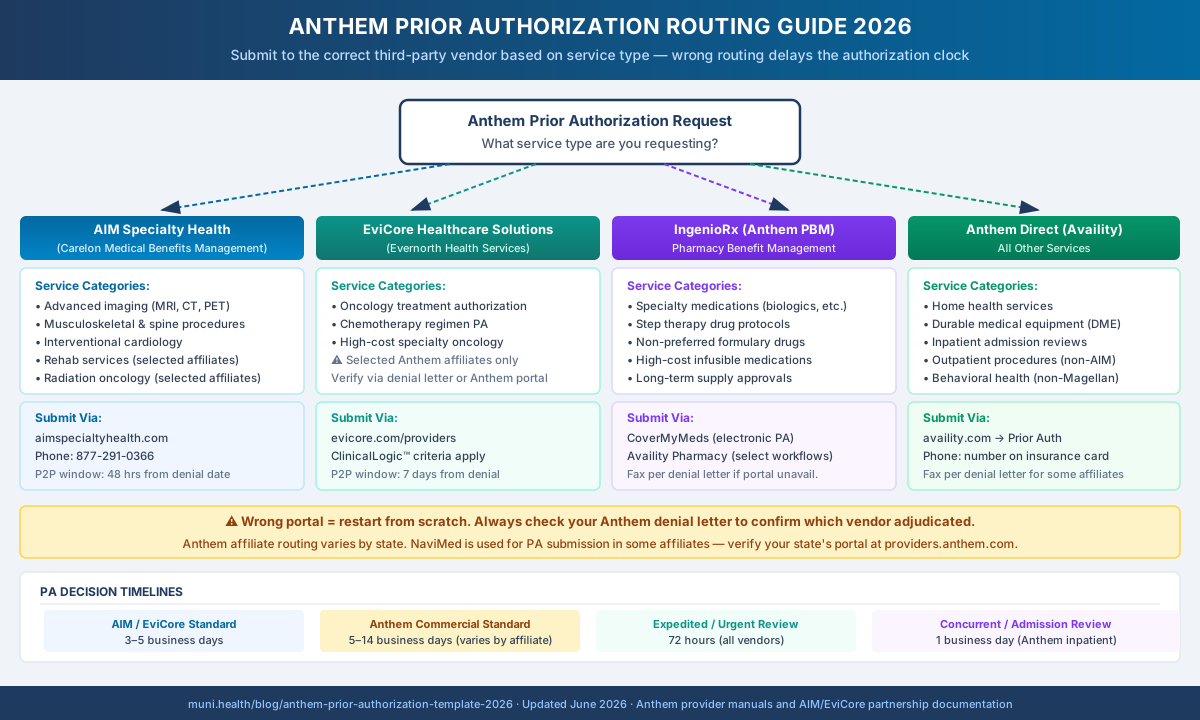
Anthem Blue Cross prior authorization submissions do not all go to Anthem directly. Depending on service type, PA routes to Carelon Medical Benefits Management (formerly AIM Specialty Health) for imaging, MSK, spine, cardiology, and oncology programs where delegated, or to CarelonRx (formerly IngenioRx) for pharmacy PA. Standard medical services go through Anthem via Availity. Submitting to the wrong portal restarts the authorization clock and delays care.
Why Anthem PA Goes to Different Review Organizations
Anthem's prior authorization process is split across multiple third-party utilization management vendors — and most billing teams don't know which portal to use until a submission bounces back.
Anthem Blue Cross Blue Shield (Elevance Health) has delegated specialty PA reviews to Carelon Medical Benefits Management, now operating under the Carelon brand, for the majority of high-cost imaging, musculoskeletal, and cardiology services. Where an affiliate has delegated oncology, Carelon reviews that too. Pharmacy PA for specialty medications flows through CarelonRx (formerly IngenioRx), Elevance's pharmacy benefit manager. Everything else goes directly to Anthem through Availity.
The problem is that Anthem's denial notices, remittance advice, and provider portals do not always make the routing source obvious. A billing team that defaults to Availity for every PA request will have imaging and spine submissions accepted, processed by the wrong team, and then either rerouted — adding days — or denied outright for improper submission channel.
Wrong Portal Restarts the Authorization Clock
Anthem and its delegated vendors do not automatically forward misdirected PA requests. Submitting an Carelon-delegated imaging PA through Availity's standard PA workflow typically results in either a rejection with instructions to resubmit to Carelon, or a delayed triage that costs 3–7 business days. Identify the correct vendor before submitting.
For a complete overview of prior authorization denial reasons and appeal rights, see the prior authorization denial complete guide.
Anthem PA Service-Type Routing Matrix
Use this table as the starting point for every Anthem PA request. Always verify the routing for your specific affiliate and plan type on the Anthem provider portal at providers.anthem.com — delegated vendor relationships vary by state and can change between plan years.
| Service Category | PA Vendor | Submission Portal / Phone | Typical Decision Window | Key Notes |
|---|---|---|---|---|
| Advanced imaging (MRI, CT, PET, nuclear) | Carelon Medical Benefits Management | providerportal.com | phone on member ID card | Per plan and urgency | Identify Carelon reference number in any denial |
| Musculoskeletal and spine procedures | Carelon Medical Benefits Management | providerportal.com | phone on member ID card | Per plan and urgency | Check the current Carelon guideline version |
| Interventional cardiology, cardiac cath | Carelon Medical Benefits Management | providerportal.com | phone on member ID card | Per plan and urgency | Some affiliates also cover cardiac imaging |
| Rehabilitation (PT, OT, speech — select affiliates) | Carelon Medical Benefits Management | providerportal.com | phone on member ID card | Per plan and urgency | Coverage by affiliate; verify at Anthem portal |
| Medical and radiation oncology (where delegated) | Carelon Medical Benefits Management | providerportal.com | phone on member ID card | Per plan and urgency | Carelon clinical appropriateness guidelines apply; verify via the affiliate PA list |
| Specialty medications and biologics | CarelonRx (formerly IngenioRx) | Per the plan's pharmacy PA instructions | Per plan and urgency | Step therapy requirements apply to many biologics |
| Non-preferred formulary and high-cost drugs | CarelonRx (formerly IngenioRx) | Per the plan's pharmacy PA instructions | Per plan and urgency | Formulary exception or step therapy bypass required |
| Home health services | Anthem Direct | Availity — Prior Auth | 5–14 business days | Clinical criteria vary by plan and state |
| Durable medical equipment (DME) | Anthem Direct | Availity — Prior Auth | 5–14 business days | Some DME categories require Anthem CMN form |
| Inpatient admission (concurrent) | Anthem Direct | Availity — Auth or phone per denial | 1 business day | Concurrent review — call is faster than portal |
| Outpatient procedures (non-delegated) | Anthem Direct | Availity — Prior Auth | 5–14 business days | Verify via Anthem PA lookup before submitting |
Sources: Anthem affiliate provider manuals and provider news, Carelon Medical Benefits Management and CarelonRx provider documentation. Verify against your affiliate's current PA list.
Submitting Prior Auth to Carelon Medical Benefits Management
For imaging, MSK, spine, and cardiology services, Carelon Medical Benefits Management (formerly AIM Specialty Health) is the correct submission destination — not Anthem.
How to submit a PA request through Carelon:
- Log into the Carelon ProviderPortal at providerportal.com
- Select your Anthem affiliate from the payer list
- Complete the PA request form — include the ICD-10 diagnosis, CPT code, patient demographics, and ordering provider NPI
- Upload supporting clinical documentation: office notes, prior treatment history, imaging results if a follow-up, and any specialist letters
- Submit and capture the Carelon reference number — you will need it if the PA is denied and you proceed to peer-to-peer review
What Carelon reviewers evaluate:
Carelon applies its Clinical Appropriateness Guidelines (CAGs), which are updated periodically, often with conservative-treatment duration requirements before advanced imaging or surgery. Before submitting, review the applicable guideline version for your service category through Carelon's provider resources. If the patient's documentation predates those criteria, note the specific guideline version in your submission.
Urgent Requests
For urgent requests, use the phone number on the member's ID card and say the request is urgent. Confirm whether a phone request starts the review clock or only the written submission does, and send supporting documentation the same day.
Peer-to-peer review when Carelon denies:
If Carelon denies the PA, the denial notice states how and by when to request a peer-to-peer discussion; the window can be short, so check it the day the notice arrives. The peer-to-peer goes through Carelon — not Anthem's utilization management team — and references the Carelon case number. The ordering or treating physician conducts the call.
For a detailed walkthrough of the Anthem denial appeal process — including what happens when the Carelon peer-to-peer does not reverse the denial — see the Anthem appeal letter template guide.
Submitting Oncology Prior Auth to Carelon
For Anthem, oncology prior authorization (medical oncology drug regimens and radiation oncology, where the affiliate has delegated them) is reviewed by Carelon Medical Benefits Management, the Elevance Health company formerly known as Carelon Medical Benefits Management. Anthem's provider news describes Carelon's clinical appropriateness guidelines for radiation oncology and oncology imaging, and requests go through the same Carelon ProviderPortal used for imaging and MSK.
Before submitting, verify the routing:
Check the Anthem provider portal for your affiliate state under "Utilization Management" → "Prior Authorization Requirements." Program scope differs by affiliate and plan, so do not assume another state's setup applies.
Carelon oncology PA submission:
- Log into providerportal.com (or call the number on the member's ID card)
- Select the Anthem health plan and the oncology program
- Enter the patient's Anthem member ID, ICD-10 code, and the specific CPT/HCPCS code for the regimen or treatment
- Attach clinical documentation: oncologist notes, pathology report, staging, prior treatment history, and the guideline basis for the regimen
- Submit and record the Carelon reference number
If Carelon denies the request: follow the peer-to-peer and appeal instructions printed on the denial notice. The ordering physician conducts any peer-to-peer discussion.
CarelonRx Pharmacy PA
CarelonRx (formerly IngenioRx) is Elevance Health's pharmacy benefit manager for most Anthem commercial and Medicare Advantage plans. Pharmacy PA for specialty medications, biologics, and non-preferred formulary drugs goes through CarelonRx — not through the standard Anthem Availity workflow.
CoverMyMeds (primary electronic PA channel):
CoverMyMeds is the preferred electronic PA submission path for CarelonRx pharmacy requests. Most specialty pharmacies and prescribing practices are already connected to CoverMyMeds. The workflow:
- Open CoverMyMeds and search for Anthem/CarelonRx as the payer
- Complete the ePA form with the drug name, NDC or HCPCS code, diagnosis, and clinical documentation
- Attach step therapy failure documentation if applicable — CarelonRx requires documentation of failure on the required first-line agents for most biologic categories
- Submit and capture the CoverMyMeds transaction ID
Availity Pharmacy (secondary channel):
For practices that do not use CoverMyMeds, Availity supports CarelonRx pharmacy PA submissions in some affiliate configurations. Log into Availity → Prior Auth → Pharmacy Benefits, and select the appropriate Anthem affiliate and CarelonRx as the PBM. Not all affiliates have this channel enabled — check your Anthem provider portal.
Step Therapy Requirements Are Strictly Enforced
CarelonRx enforces step therapy protocols for most biologic categories. Submitting a PA for adalimumab, etanercept, or other high-cost biologics without documenting failure on the required first-line agents (typically 3–6 months of a conventional DMARD) will result in an automatic denial. Attach clinical notes showing the dates, doses, and clinical response to each step therapy agent. Vague statements that step therapy "was not appropriate" are insufficient without a diagnosis-specific contraindication.
Formulary exceptions:
If the drug is a non-preferred brand where a preferred alternative exists, CarelonRx requires a formulary exception request in addition to PA. The exception must document why the preferred alternative is clinically inappropriate for this patient — intolerance, contraindication, or prior treatment failure with the preferred agent.
Standard Anthem PA via Availity
For services not delegated to Carelon or CarelonRx, prior authorization goes directly to Anthem through Availity.
Availity PA submission:
- Log into availity.com → Auth & Referrals → Prior Authorization
- Select the appropriate Anthem affiliate from the payer dropdown
- Enter member ID, ICD-10, CPT code, and requesting provider NPI
- Attach clinical documentation — office notes, specialist referrals, and any prior treatment records supporting medical necessity
- Submit and capture the Availity Tracking Number
NaviMed — Anthem's e-PA platform in select affiliates:
Some Anthem affiliates use NaviMed as their electronic prior authorization platform for specific workflows, particularly for services accessed through Anthem's clinical management programs. NaviMed is integrated with Availity in many configurations, but in some states it operates as a standalone portal linked from the Anthem provider portal. If Availity's PA submission channel does not display an Anthem result for your service type, check the Anthem provider portal for your state for NaviMed routing instructions.
Verifying PA requirements before submitting:
Anthem's PA requirements change by plan year. Use the Anthem PA lookup tool at providers.anthem.com before submitting to confirm whether a specific CPT code requires PA for a given affiliate, plan type, and member's contract. A PA submitted for a service that does not require authorization delays claim processing unnecessarily and creates an administrative paper trail without value.
Anthem Prior Authorization Request Template
Use this template for written PA submissions to Anthem or Carelon. Adjust the recipient and reference numbers based on the correct routing vendor identified above.
[Practice Letterhead]
[Date]

[Carelon Medical Benefits Management / Anthem Prior Authorization Department]
[Portal Submission or Fax Number from Anthem Provider Portal]

Re: Prior Authorization Request
Member Name:      [Patient Full Name]
Member ID:        [Anthem Member ID]
Date of Birth:    [DOB]
Group/Plan:       [Anthem Plan and Group Number]
Diagnosis:        [ICD-10-CM Code] — [Diagnosis Description]
Requested Service:[CPT Code] — [Procedure/Service Description]
Requested DOS:    [Date or Date Range]
Place of Service: [Inpatient / Outpatient / Office / Facility]
Requesting Provider: [Name, NPI, Practice, Phone, Fax]
Rendering Provider:  [If different from requesting]

─────────────────────────────────────────────────
CLINICAL SUMMARY
─────────────────────────────────────────────────

Patient is a [age]-year-old [sex] presenting with [diagnosis/condition].
Relevant history: [Duration of condition, prior diagnoses, comorbidities].
Current treatment: [Medications, PT, prior procedures as applicable].

─────────────────────────────────────────────────
MEDICAL NECESSITY JUSTIFICATION
─────────────────────────────────────────────────

The requested [service/medication] is medically necessary for this patient
because [specific clinical finding, objective measure, or symptom burden].

[For Carelon submissions — address the applicable Clinical Appropriateness Guideline:]
Per Carelon Clinical Appropriateness Guideline for [category], Section [X]:
Criterion: [Exact criterion text]
Patient meets criterion because: [Clinical documentation reference]

[For Carelon oncology submissions — address the applicable guideline:]
Per Carelon clinical appropriateness guideline [oncology program and guideline name]:
Criterion: [Exact criterion text]
Supporting evidence: [NCCN Category reference if applicable, clinical notes]

[For CarelonRx/pharmacy — document step therapy completion:]
Step therapy requirements:
Step 1 — [Drug name]: Initiated [date], discontinued [date].
Reason: [Intolerance / Inadequate response / Contraindication]
Step 2 — [Drug name, if applicable]: Same format.
Clinical basis for requested agent: [Specific medical necessity]

[For Anthem direct — document per applicable clinical criteria:]
Medical necessity documentation consistent with:
[Anthem Medical Policy number, if available]
[InterQual criteria, if applicable for level-of-care decisions]

─────────────────────────────────────────────────
CONSERVATIVE TREATMENT HISTORY (if applicable)
─────────────────────────────────────────────────

Prior treatment attempted:
- [Treatment 1]: [Dates] — [Outcome]
- [Treatment 2]: [Dates] — [Outcome]
- [Treatment 3, if applicable]

Reason advanced service is now appropriate: [Clinical explanation]

─────────────────────────────────────────────────
SUPPORTING DOCUMENTATION ENCLOSED
─────────────────────────────────────────────────

[ ] Office/visit notes: [dates]
[ ] Diagnostic results (labs, imaging, pathology): [dates]
[ ] Specialist letters or referral notes
[ ] Prior treatment records
[ ] Step therapy failure documentation (pharmacy PA)
[ ] NCCN or clinical guideline excerpt (oncology)
[ ] Prior authorization approval history (if concurrent/renewal)

─────────────────────────────────────────────────

This request is submitted on behalf of [Patient Name] for the above service.
Please direct questions or requests for additional clinical information to:

[Contact Name, Title]
[Practice Name]
[Phone] | [Fax]
[Email if accepted]
NPI: [Number]

Sincerely,
[Ordering Physician Name, Credentials]
[Practice Name]
[Date]
Skip the blank template. Start with a review-ready draft.
Use the template as guidance, or let Muni prepare a payer-specific draft for your team to verify, sign, and submit.
First 3 appeals free, then $20 per appeal. Start with your denial letter or EOB and available records. No meeting or clearinghouse connection required.
When Anthem PA Is Denied: Peer-to-Peer and Appeal Path
A PA denial from Anthem or Carelon is not the end of the process. Each has its own peer-to-peer process and formal appeal path, stated on the denial notice.
Prepare this appeal packet with your team.
Draft the appeal, coordinate missing documents, and approve the reviewed packet. Keep your clearinghouse; your practice checks deadlines and submits through the payer’s accepted channel.
First 3 appeals free, then $20 per appeal. Start with your denial letter or EOB and available records. No meeting or clearinghouse connection required.
| Denial Source | P2P Window | P2P Contact | Formal Appeal Window | Appeal Submission |
|---|---|---|---|---|
| Carelon Medical Benefits Management (imaging, MSK, cardiology, oncology) | Per denial notice; often short | Number on the denial notice / Carelon ProviderPortal | 60–180 days (per Anthem affiliate) | Submit written appeal to Anthem — address to Anthem, reference Carelon case number |
| CarelonRx (pharmacy denial) | Per denial notice | Pharmacy line on the denial notice | Check denial letter — CarelonRx or Anthem pharmacy appeal | Per denial notice |
| Anthem Direct | Request within 30 days of denial | Anthem Provider Services — number on denial | 60–180 days by affiliate and plan type | Availity — Submit Appeal/Dispute, or fax per denial letter |
For Carelon Denials: P2P Before Written Appeal
For Carelon-adjudicated denials, the 48-hour peer-to-peer review is the highest-leverage first step — faster to schedule, faster to resolve, and conducted by an Carelon clinical reviewer who can reverse the denial on the call. Written appeals to Anthem that arrive before the Carelon P2P process is attempted typically produce a longer review cycle. Request the Carelon P2P first, then file the written appeal only if the P2P does not reverse the denial.
For a complete Anthem appeal letter template and step-by-step written appeal guide, see the Anthem appeal letter template 2026. For peer-to-peer review strategy across all insurers, see the peer-to-peer review guide.
Anthem Affiliate PA Contact Reference
PA portals, phone numbers, and NaviMed availability vary across Anthem's 14-state footprint. This table covers key affiliates — always verify current details at providers.anthem.com/[your-state]-provider before submitting.
| Anthem Affiliate | Carelon Delegation | Standard PA Channel | NaviMed Available | Notes |
|---|---|---|---|---|
| Anthem BCBS California | Imaging, MSK, spine, cardiology | Availity or fax per denial | Selected workflows | Shortest commercial provider dispute window in BCBS system |
| Anthem BCBS Colorado | Imaging, MSK | Availity | No | Rocky Mountain Hospital and Medical Service, Inc. |
| Anthem BCBS Connecticut | Imaging, MSK, rehab | Availity | No | |
| Anthem BCBS Georgia | Imaging, MSK, spine | Availity | No | |
| Anthem BCBS Indiana | Imaging, MSK, rehab (expanded) | Availity | No | Anthem Insurance Companies, Inc. |
| Anthem BCBS Kentucky | Imaging, MSK | Availity or state portal | Check portal | |
| Anthem BCBS Maine | Imaging, MSK | Availity or fax | No | |
| Anthem BCBS Missouri | Imaging, MSK, spine | Availity | No | |
| Anthem BCBS Nevada | Imaging, MSK | Availity or fax | No | |
| Anthem BCBS New Hampshire | Imaging, MSK | Availity or fax | No | |
| Empire BCBS New York | Imaging, MSK, spine | Availity | No | Operates as Empire BlueCross BlueShield in NY |
| Anthem BCBS Ohio | Imaging, MSK, spine | Availity | No | |
| Anthem BCBS Virginia | Imaging, MSK, spine, cardiology | Availity | Selected workflows | |
| Anthem BCBS Wisconsin | Imaging, MSK, rehab | Availity | No |
How Muni Appeals Supports Anthem PA Workflows
Anthem's split-vendor PA structure creates consistent submission errors for billing teams that handle multiple payers — the Carelon/CarelonRx/Availity routing decision is not obvious from the Anthem member ID or insurance card, and it changes by affiliate and by service category.
After an Anthem PA denial, Muni Appeals can support preparation by:
- Surfacing the likely vendor and affiliate context stated in the uploaded denial for staff verification
- Surfacing deadline-risk and P2P-window guidance while staff retains calendar ownership
- Preparing appeal documentation organized around candidate criteria for staff verification
- Organizing uploaded step-therapy or formulary-exception evidence into a review checklist
- Provides likely Anthem affiliate routing guidance for staff to verify before filing when peer-to-peer review does not reverse the denial
Frequently Asked Questions
Does Anthem prior authorization always go through Availity?
No. Anthem has delegated specialty PA reviews to third-party vendors for many high-volume service categories. Imaging, MSK, spine, and cardiology PA go through Carelon Medical Benefits Management. Where delegated, oncology PA also goes through Carelon. Pharmacy PA for specialty medications routes through CarelonRx via CoverMyMeds. Only services not covered by those delegations are submitted directly through Availity's standard prior auth workflow.
How do I know if Carelon Medical Benefits Management is handling my Anthem PA request?
Carelon-delegated service categories are listed in the Anthem provider manual for your affiliate state, accessible at providers.anthem.com. If a PA request is submitted to Anthem via Availity for an Carelon-delegated service, Availity or Anthem should redirect you to Carelon — but this rerouting is not immediate and adds days to the review. Check the PA requirement lookup tool first. If an Carelon denial has been issued, look for "Carelon Medical Benefits Management" or "Carelon" in the denial header and an Carelon Reference Number in the case details.
What is the Anthem PA deadline for standard commercial services?
Anthem commercial plan PA decision timelines vary by affiliate and service type. Standard non-urgent requests typically receive a decision within 5–14 business days. Urgent requests — where delay would seriously jeopardize the patient's health — are entitled to a determination within 72 hours under federal law (29 CFR § 2560.503-1 for ERISA plans, and ACA rules for fully-insured plans). Concurrent reviews for active inpatient admissions typically receive decisions within 1 business day.
What is CarelonRx and how does it handle pharmacy PA?
CarelonRx is Anthem's (Elevance Health's) pharmacy benefit manager for most Anthem commercial and Medicare Advantage plans. When a specialty medication, biologic, or non-preferred drug requires prior authorization, the request goes to CarelonRx — not to Anthem's medical PA team. Submit CarelonRx pharmacy PA through CoverMyMeds, which integrates with most specialty pharmacy and prescribing practice workflows. Formulary exceptions require separate documentation beyond the standard PA request.
Can I use CoverMyMeds for all Anthem PA submissions, or only pharmacy?
CoverMyMeds is the correct channel for CarelonRx (pharmacy benefit) PA requests. It is not used for medical service PA to Carelon or Anthem's standard utilization management team. Medical service PA — imaging, procedures, inpatient, DME — goes through Carelon's ProviderPortal or Availity depending on service type. CoverMyMeds and medical PA are entirely separate submission tracks at Anthem.
Who decides an Anthem oncology PA?
Where the affiliate has delegated oncology, Carelon Medical Benefits Management reviews it against its clinical appropriateness guidelines. Standard decision times depend on the plan; urgent requests, where delay would seriously jeopardize the patient's health, are entitled to a decision within 72 hours. Attach the guideline basis for the regimen with the initial submission.
What happens if I submit an Carelon-delegated PA through Availity by mistake?
Availity may accept the submission and route it to Anthem's internal UM team, which will then redirect it to Carelon. This redirection process is not immediate — it typically adds 3–7 business days before Carelon begins its review. The authorization clock does not start until Carelon receives a complete submission. If the service has a clinical urgency component, the misdirection may cause the PA timeline to overlap with a scheduled procedure date. Submit directly to Carelon for all imaging, MSK, spine, and cardiology requests.
Does the Anthem PA routing change for Medicare Advantage plans?
Yes. Anthem Medicare Advantage plans follow CMS prior authorization rules under the CMS Interoperability and Prior Authorization Final Rule (CMS-0057-F), which took effect January 1, 2026. For MA plans, Carelon continues to handle its delegated service categories, but the decision timelines are governed by CMS requirements: for services subject to prior authorization, standard decisions within 7 calendar days and expedited within 72 hours. If Anthem or Carelon misses that deadline, the failure to give timely notice is itself treated as an adverse organization determination under 42 CFR 422.568(f) — a denial you can appeal immediately, not an approval. Document the submission date, track the CMS deadline independently from the standard commercial timeline, and file the appeal on the missed date rather than waiting for a decision that is already late.
Ready to Submit Anthem PA Without the Routing Confusion?
The Carelon/CarelonRx/Availity split is Anthem's biggest billing workflow trap. A service that routes to the wrong vendor loses days — sometimes enough to interfere with a scheduled procedure or treatment start date.
Quick reference checklist before submitting any Anthem PA:
- Confirm service type and check Anthem provider portal for your affiliate's PA delegation list
- Imaging, MSK, spine, cardiology → Carelon at providerportal.com
- Oncology (where delegated) → Carelon at providerportal.com
- Specialty medication, biologic, non-preferred drug → CarelonRx via CoverMyMeds
- All other services → Anthem direct via Availity → Prior Auth
- Capture and record the submission reference number from whichever vendor received it
- Track the clinical urgency threshold — if urgent, state it and request 72-hour review at submission
This guide reflects 2026 Anthem Blue Cross Blue Shield prior authorization procedures across all 14 Anthem affiliates. Delegated vendor relationships, PA requirements by service category, and portal routing are subject to change by plan year and affiliate. Always verify current PA requirements at providers.anthem.com for your specific affiliate. This guide does not constitute legal or clinical advice.